Continuous Integration – Start at the beginning

Sometimes it’s easier to create a good Continuous Integration system from scratch than it is to improve a system which has been all bent out of shape to support bad practices or legacy issues. But if you’re going to take a wrecking ball to your CI system and start again, exactly how do you actually start? Well, in my experience, the best implementation I’ve worked on has been when the customer’s requirements were clearly understood first.


Start at the Beginning

Rather than go ahead and start by choosing your favorite CI tools and defining a standard system, start by picking up a pen and paper and go and speak with as many people involved in project delivery as you possibly can. This should include BAs, Project Managers, Testers, Developers and Systems Architects. Ask them what inputs and outputs they would expect to see and receive from the build and deploy system. Ask them what manual steps they do – you never know, your CI system might be able to help automate some of their work, even for the BAs. Quite often, Project Managers want to see quality metrics from their projects, and to get these they often rely on a manual process, perhaps expecting QA to produce bug statistics or asking a developer to produce some build reports. It seems that quite often, people are unaware of exactly what a CI system can really do for them.


Collaborative Design

Using the feedback from these sources, start to define a system on paper and continue to get feedback on your design. This needn’t be a long task, but it will help to stop you from going down the wrong path early on. Concentrate on simplicity and consistency. An over elaborate system will be hard for people to understand and then support, and ultimately that can be damaging. Don’t have several systems all doing the same thing, just have the one, reduce wasteful repetition. Don’t have 2 different types of build server in use unless you have to. Don’t support 2 types of static analysis tool that effectively measure the same thing, instead, settle on one.

In your design, be sure to include:

  • A Source Control system
  • A build tool or tools
  • Unit test framework(s)
  • A static analysis system
  • A reporting mechanism (possibly a dashboard)
  • Integration and Acceptance testing
  • A deployment mechanism

Design your system with the aim of making it work seamlessly, all the constituent parts should ultimately work together in an automated flow. You will find, as the system gets used, that there are likely to be several manual inputs into your system which it may be possible to automate further. For instance, I have seen an automated Hudson/Bamboo plan creation system using selenium, where users have only to input a fraction of the number of details than they would otherwise need to!

Target bottlenecks. Invest a proportionate amount of time addressing the high priority, high value parts of the system. Work out where the bottlenecks were in the old system (or the manual system you are hoping to replace) and invest the right amount of time working on those areas. There’s no point producing a system that can reliably deploy software to any OS when you only need to support one, especially if your build process is shaky and could do with more attention!


Choose your Tools Carefully

When deciding what tools to use for your system, there are a number of things to consider. The obvious ones are cost, suitability for purpose, performance and scalability. But consider other factors as well, such as how readily available the support for your tools is, check out the user communities presence and their support coverage. Also consider personal preference! If a whole team really want to use a particular tool for some reason, perhaps they’ve been excited about it for some time, then at least consider using it, you know it will get that team’s support!


Sell it!

Before you start the hard (but fun) work of implementing your system, be sure you get the buy-in you need from the management. I’m not just talking about getting approval, I literally mean buy-in. Management should feel invested in this system. Sell the system to them by highlighting the existing issues that it is going to help solve. The more the management teams buy into Continuous Integration, the more support it will get, the more it will be used, and the better we become at making software. If we fail to get management buy-in, we can easily be left with a system that is all too easily overlooked and ignored, and we can end up with a Continuous Integration System, but not actually practicing Continuous Integration.


Installing Sonar on the CI server

I’ve been trying out Sonar and it looks great – it’s much more presentable than trawling through maven sites to find build reports. Anyway, I decided to install it on the live build server today, and this is how it happened:

What you’ll need:

Maven

Java JDK

Download Sonar from http://www.sonarsource.org/downloads/

Copy the zip archive over to the build server. I unzipped it in /home/maven/sonar

I’m running a linux x86 32 bit system, so to start Sonar, I cd to:

/home/maven/sonar/sonar-2.5/bin/linux-x86-32

and run:

./sonar.sh start

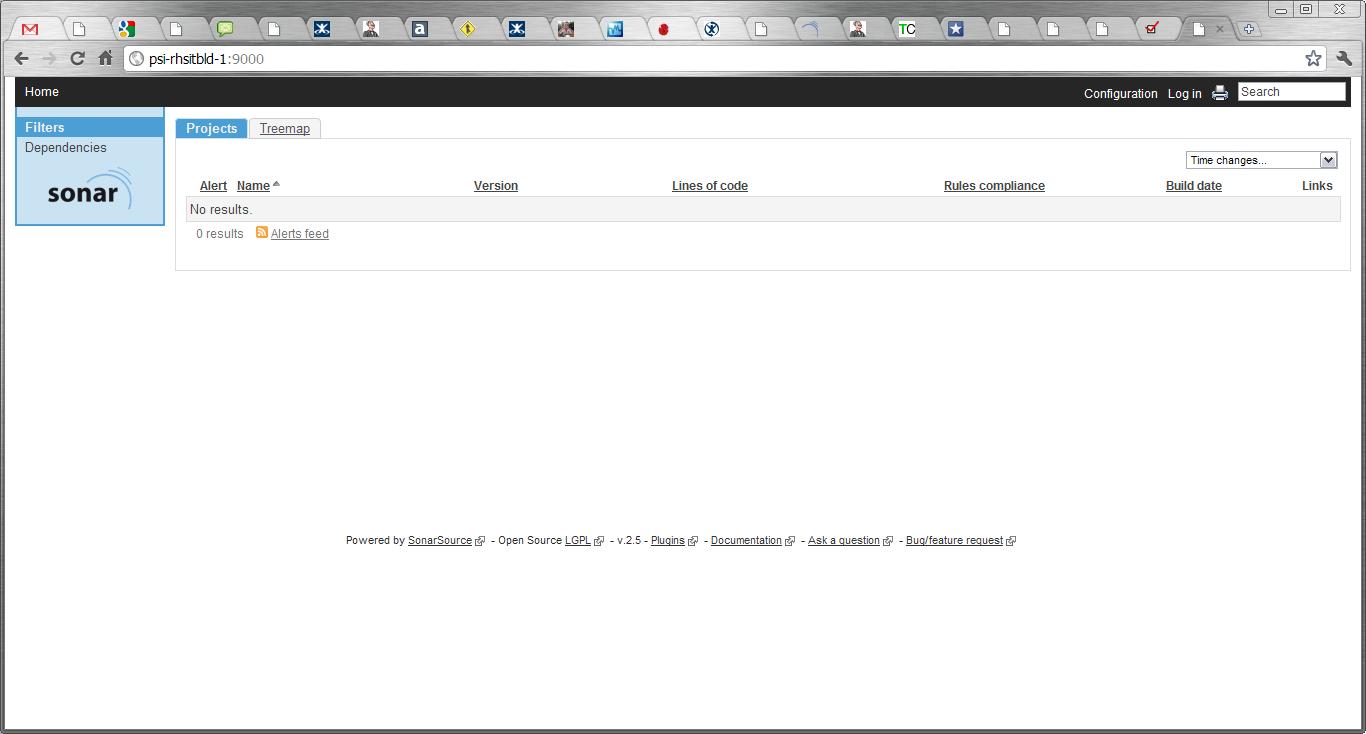
Sometimes it can take a few minutes for the server to start up, so be patient. Eventually you’ll find your Sonar site up and running at http://{SERVERNAME}:9000 (where {SERVERNAME} is the name of your build server where you installed Sonar. It should look a bit like this:

Next, you have to configure Maven. I’m running with the default Apache Derby database which ships with Sonar, so I added the following section to my maven settings.xml (which I found under /home/maven/maven-2.0.9/conf). You need to add this to the <profiles> section:

<profile>
<id>sonar</id>
<activation>
<activeByDefault>true</activeByDefault>
</activation>
<properties>

<sonar.jdbc.url>
jdbc:derby://localhost:1527/sonar;create=true
</sonar.jdbc.url>
<sonar.jdbc.driver>org.apache.derby.jdbc.ClientDriver</sonar.jdbc.driver>
<sonar.jdbc.username>sonar</sonar.jdbc.username>
<sonar.jdbc.password>sonar</sonar.jdbc.password>
<sonar.host.url>http://localhost:9000</sonar.host.url>

</properties>
</profile>

Then you will need to run your first project against sonar! Go to the root of one of your projects on the build server (for me they were in /home/maven/Bamboo/xml-data/build-dir/PROJ_NAME) and run:

mvn clean install sonar:sonar

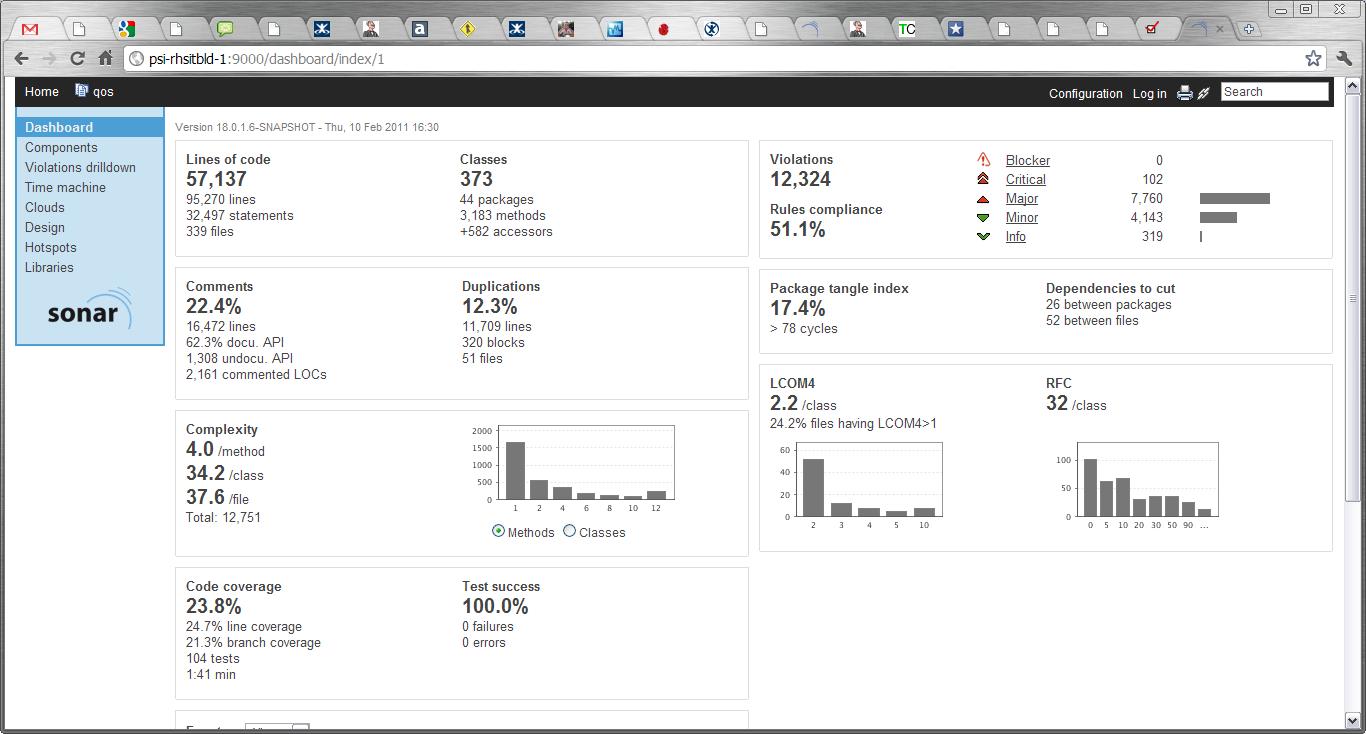
Go to http://{SERVERNAME}:9000 and you should now see your project listed. Click on it and revel in sonar goodness:

I’ll migrate to a MySQL db next week, and put an update here about what to do.

UPDATE:

Using a MySql db is a doddle. Once you’ve installed the MySql you simply comment out the Derby db connection details and uncomment the MySql section in the sonar.properties file (which lives in the conf directory of your sonar installation)

sonar.jdbc.url:                            jdbc:mysql://localhost:3306/sonar?useUnicode=true&characterEncoding=utf8
sonar.jdbc.driverClassName:                com.mysql.jdbc.Driver
sonar.jdbc.validationQuery:                select 1

And that’s it!

Principles of Continuous Integration

I’m a big fan of CI, and as a simple best practice/process for development teams I think it’s right up there as one of the most important to get right. Most software places now have a Continuous Integration system, but do they actually practice Continuous Integration? In my experience the answer isn’t always “yes”.

For me, practicing CI goes a lot further than simply having a CI system setup, and running check-in/nightly builds and running unit test/code inspections etc and so on.

So what is my definition of “Practicing Continuous Integration”? Well, for me it is simply:

  • Having a CI system (obviously)
  • Adopting the principles of Continuous Integration

I did a quick google to see if I could find a simple list of some good CI principles – I know I’ve read many of them before in numerous good books such as Paul M Duvall’s “Continuous Integration” and Jez Humble’s “Continuous Delivery”, but I couldn’t find an easy cut-out-and-use version on the internet, so I’ve decided to knock something up here 🙂

Everyone loves a good list so here’s a list of what I believe to be some principles of CI:

  1. Fix your build failures, immediately. Never leave a build broken. If you do, the build team should be within their right to roll back your last commit.
  2. Every check-in should be an improvement on the last. Each check-in should have value, otherwise why do it? An improvement could be defined as a new piece of functionality, a bug fix, an increase in code coverage etc. If the improvement cannot be easily measured, ensure you detail it in your commit log.
  3. Never check-in on a broken build (unless you’re fixing the breakage)! If you have multiple commits to a codebase after the original breaking commit, then this leaves a bit of a bad smell in your CI system. Firstly, unless your commits are coming thick and fast, it means you aren’t reacting to your build failures, and this is not acceptable – it basically means you’re not playing ball and your letting the rest of the team down. Secondly, the cause of the original breakage can potentially be a lot harder to identify if several other check-ins have happened since the original check-in which broke the build!
  4. Code should be built and tested before checking in to source control. You can either do this by compiling the build locally yourself and checking that the tests pass, or you could invest in a CI/VC system that can perform pre-commit builds, such as Pulse, TeamCity and ElectricCommander (list obtained from Jez Humble’s Continuous Delivery book). However, you can use pre-commit hooks in svn to achieve something similar, and I’m led to believe this can also be done in Git and buildbot.
  5. Everyone should be interested in the output of the CI system. And that includes project managers and testers. Working on the principle that at some point a build works, and every commit thereafter is an improvement, we should be proud to display the results of every build to the whole project team, and we should react quickly if, for any reason, our last check-in was not an improvement to the state of our software.
  6. Functional automated tests should be run as part of the CI process. If you have a suite of automated regression tests, the chances are it’s no great effort to hook them up to the CI system, and definitely worth it in the long run.
  7. Make the builds fit for purpose. I absolutely hate having to wait ages for a simple check-in build to compile, when all I really want to know is whether I have broken my unit tests or violated some important rule. Make the check-in builds quite lightweight, run your unit tests and code coverage tests only, perhaps. Do you really need to run all your code inspections and analysis tools as well as run automated functional tests every time there’s a check-in? Chances are you don’t, so keep the check-in builds light, and leave the heavy duty work for the nightly builds, while we’re all asleep!
  8. React to the feedback. The CI system is a tool to help drive improvement and quality as much as anything else, so we should never ignore it. However, it’s easy to ignore your CI system if the feedback isn’t relevant. The solution is to work closely with the build team, as well as the rest of the project members, to ensure the build feedback is targeted and relevant

That’s about it for my list so far, I’m sure I’ll add to it as time goes by. Please feel free to add your suggestions!

Fun with FindBugs

We’ve just moved to a new master pom file in an effort to make our lives a bit easier, and to allow certain builds to carry on using the old master pom file which was basically quite rubbish. You see, the old master pom file just defined a load of plugins, mostly in the plugin management section, so they had to be referenced by the application poms anyway. The idea with the new master pom is that it enforces the use of certain plugins, and ALSO enfiorces certain standards for builds to pass – for instance, we included a cobertura coverage rate of 80% and made the builds fail if there were any findbugs issues. It sounded like a good idea at the time. So, we put these plugin definitions directly into the build section of the pom, like so:

<build>

<plugins>
<plugin>
<artifactId>maven-compiler-plugin</artifactId>
<configuration>
<source>1.6</source>
<target>1.6</target>
</configuration>
</plugin>

<plugin>
<artifactId>maven-surefire-plugin</artifactId>
<version>2.4</version>
<configuration>
<testClassesDirectory>
build/maven/${artifactId}/target/test-classes
</testClassesDirectory>
</configuration>
</plugin>

<plugin>
<groupId>org.codehaus.mojo</groupId>
<artifactId>cobertura-maven-plugin</artifactId>
<version>2.4</version>
<configuration>
<formats>
<format>html</format>
<format>xml</format>
</formats>
<check>
<totalBranchRate>54</totalBranchRate>
<totalLineRate>75</totalLineRate>
</check>
</configuration>
<executions>
<execution>
<goals>
<goal>clean</goal>
<goal>check</goal>
</goals>
</execution>
</executions>
</plugin>

<plugin>
<groupId>org.apache.maven.plugins</groupId>
<artifactId>maven-pmd-plugin</artifactId>
<version>2.5</version>
<executions>
<execution>
<goals>
<goal>check</goal>
<goal>cpd-check</goal>
</goals>
</execution>
</executions>
<configuration>
<linkXref>true</linkXref>
<targetJdk>1.6</targetJdk>
<sourceEncoding>utf-8</sourceEncoding>
<failOnViolation>false</failOnViolation>
<outputDirectory>build/maven/${pom.artifactId}/target/pmd-reports</outputDirectory>
</configuration>
</plugin>
<plugin>
<groupId>org.codehaus.mojo</groupId>
<artifactId>findbugs-maven-plugin</artifactId>
<version>2.3.1</version>
<!– NOT USING THIS YET
<executions>
<execution>
<goals>
<goal>check</goal>
</goals>
</execution>
</executions> –>
</plugin>
</plugins>
</build>

The first thing I had to do (as you can see) is disable the check goal because it was causing findbugs to fail pretty much every build. The next thing I had to do was remove the whole of the following configuration section from the findbugs plugin:

<configuration>
<threshold>High</threshold>
<effort>Max</effort>
<xmlOutput>true</xmlOutput>
<xmlOutputDirectory>build/maven/${artifactId}/target/site</xmlOutputDirectory>
</configuration>

I’ve kept this section in the reporting section though.

The next thing I got was this error:

03-Nov-2010 09:53:03 [java] Java Result: 1
03-Nov-2010 09:53:03 [Fatal Error] findbugsTemp.xml:1:1: Premature end of file.
03-Nov-2010 09:53:03 [INFO] ————————————————————————
03-Nov-2010 09:53:03 [ERROR] FATAL ERROR
03-Nov-2010 09:53:03 [INFO] ————————————————————————
03-Nov-2010 09:53:03 [INFO] Premature end of file.
03-Nov-2010 09:53:03 [INFO] ————————————————————————
03-Nov-2010 09:53:03 [INFO] Trace
03-Nov-2010 09:53:03 org.xml.sax.SAXParseException: Premature end of file.

and that was fixed by changing this bit of the findbugs plugin configuration:

<effort>Max</effort>

to this:

<effort>Default</effort>

So, in short, using “Max” gives us java out of memory exceptions. Which is not exactly convenient. Not sure how to fix this though.

Best Practices for Build and Release Management Part 2

Ok, as promised in Part 1, I’ll go into a bit more detail about each of the areas outlined previously, starting with…

The Build Process

This area, perhaps more than any other area I’ll be covering in this section, has benefited most from the introduction of some ultra handy tools. Back in the day, building/compiling software was fairly manual, and could only be automated to a certain degree, make files and batch systems were about as good as it got, and even that relied on a LOT of planning and could quite often be a nightmare to manage.

These days though, the build phase is exceedingly well catered for and is now a very simple process, and what’s more, we can now get an awful lot more value out of this single area.

As I mentioned before, one of the aims of release management is to make software builds simple, quick and reliable. Tools such as Ant, Nant (.Net version of Ant), Maven, Rake and MSBuild help us on our path towards our goal in many ways. Ant, MSBuild and Nant are very simple XML based scripting languages which offer a wide ranging level of control – for instance, you can build entire solutions with a single line of script, or you can individually compile each project and specify each dependency – it’s up to you to decide what level of control you need. I believe that build scripts should be kept simple and easy to manage, so when dealing with NAnt and MSBuild for .Net solutions I like to build each project by calling an .proj file rather than specifically compiling each library. The .proj files should be constructed correctly and stored in source control. Each build should get the latest proj file  (and the rest of the code, including shared libraries – more on that later) and compile the project.

For Java projects. Ant and Maven are the most popular tools. Ant, like Nant, gives the user a great deal of control, while Maven has less inherent flexibility and enforces users to adhere to its processes. However, both are equally good at helping us make our build simple, quick and reliable. Maven uses POM files to control how projects are built. Within these POM files a build engineer will define all the goals needed to compile the project. This might sound a little tedious but the situation is made easier by the fact that POM files can inherit from master/parent POM files, reducing the amount of repetition and keeping your project build files smaller, cleaner and easier to manage. I would always recommend storing as much as possible in parent POM files, and as little as you can get away with in the project POMs.

One of the great improvements in software building in recent years has been the introduction of Continuous Integration. The most popular CI tools around are CruiseControl, CruiseControl.Net, Hudson and Bamboo. In their simplest forms, CI tools are basically just schedulers, and they essentially just kick off your build tools. However, that’s just the tip of the iceberg, because these tools can do much, MUCH more than that – I’ll explain more later, but for now I’ll just say that they allow us to do our builds automatically, without the need for any human intervention. CI tools make it very easy for us to setup listeners to poll our source code repositories for any changes, and then automatically kick off a build, and then send us an email to let us know how the build went. It’s very simple stuff indeed.

So let’s take a look at what we’ve done with our build process so far:

  • We’ve moved away from manually building projects and started using simple build scripts, making the build process less onerous and not so open to human error. Reliability is on the up!
  • We’ve made our build scripts as simple as possible – no more 1000 line batch files for us! Our troubleshooting time has been significantly reduced.
  • We’ve moved away from using development UIs to make our builds – our builds are now more streamlined and faster.
  • We’ve introduced a Continuous Integration system to trigger our builds whenever a piece of code is committed – our builds are now automated.

So in summary, we’ve implemented some really simple steps and already our first goal is achieved – we’ve now got simple, quick and reliable builds. Time for a cup of tea!

Best Practices for Build and Release Management Part 1

Firstly, Release Management has been around for long enough for it to no longer mean what it used to mean. Release Management used to be concentrated on the discipline of “creating a release of software”, that generally involved the following key points:

  • How to create or build a reliable “release”
  • How to get that reliable release out into the wild

The sorts of issues that these key points in turn raised were things like:

  • How to reliably and repeatably “build” (compile) software
  • How to make software builds quicker
  • How to make software builds easier
  • How to package software builds (zips, .msi etc)

We used to spend our time working with make files, batch files and countless checklists, running manual builds, and then we’d painstakingly create installers or configure zip files to deploy our releases. And when things went wrong, they usually went seriously wrong, and repeating the build and release process could take days.

Since those bad old days, Release Management has come a long way. Lots of the old issues have been addressed by some exceedingly neat tools which have placed emphasis on automation and quality (I’m thinking Ant/Nant, Cruise Control, the Continuous Integration process, Hudson and loads more). But one other major thing has happened in the world of Release Management, and that’s ITIL.

ITIL has redefined the practice of Release Management as more of a planning and coordinating role, it even goes so far as to say Release Management involves communicating with customers and managing customer expectation. This is a million miles away from writing complex batch files, hundreds of lines long, to compile and deploy software to a QA environment! In an ITIL world, the issues listed earlier either don’t exist, or have been addressed already and are no longer a concern to a Release Manager.

So why does the ITIL version of Release Management differ so much from the real world job of a Release Manager?

Well, I would guess that the “build management” aspect is simply not considered part of release management, and that it should be covered somewhere else, but that’s just my guess, I’m seeking some advice from ITIL about that right now.

What we’re left with now is a world where “Release Management” means one thing to one person, and something completely different to another. I’m from the old school of Release Management, I like to actually produce stuff. In a second I’ll outline what I consider to be the main roles and objectives of Release Management, and then later I’ll take each one and explain some ways that I’ve used for tackling them.

So, I like to think of Release Management as a practice which:

  • Helps make software builds simple, quick and reliable. This is achieved by employing the best tools for the job. This means understanding all the various build tools, seeing how they integrate with the systems that already exist in the workplace, and making an informed choice. There’s no way you’re going to make software builds easier, more reliable and repeatable by implementing a manual solution, so get to grips with the various build tools out there and make them work for you.
  • Helps make software deployments simple, quick, reliable and repeatable. Again, this is a bit like the above, but there are fewer tools to choose from. Manually deploying releases is painful and risky, and it also belongs in the dark ages and should be outlawed. There are still plenty of options and combinations of tools to make this task fully automated.
  • Helps take care of configuration management. When I say configuration management, I’m talking about all those issues with how to make a software release look, feel and behave the same from one environment to the next. For me this falls into Release Management because Release Management, unlike development, QA or Operations, has a direct involvement in every environment along the way to releasing into the wild. It’s pointless asking the development team to tackle the issues of configurations between environments when they have very little or no visibility of the production environment, and besides, their time would be much better spent making that button look cooler because that’s what the business has asked for!
  • Helps drive software quality. Thanks to the Continuous Integration process, and the tools that have been built around it, it’s now possible for us to build software every single time a piece of code is checked in, run a suite of unit tests, analyse the code for lazy programming and report on the amount of test coverage a project has. And that’s just the start. There are tools out there for doing much much more than this, and I’ll go into more detail about this later.
  • Helps optimise development and QA time. By giving the dev team the feedback on the quality of their code and telling them where they’re going right and going wrong, we’re helping them target their efforts. Furthermore, if were busy providing these solutions for them, doing the builds, configurations and releases, the developers can get busy doing the stuff they’re skilled at doing. For the QA team, we’re finding bugs and failing releases before the releases even get to them! (of course, if we find too many bugs and fail a release, that release won’t even get o QA)
  • Speeds up time to market. Ok, so we’ve made builds quicker, easier and more reliable, we’ve sped up the process of fine tuning code quality, we’ve spotted bugs before a round of QA has even begun and we’ve made the process of releasing our software out into the wild quicker and simpler. Basically we’ve saved a heap of time in dev, QA and Operations and so our new, higher quality software, can be released efficiently into the wild. Happy days!

As promised earlier, I’ll spend a while giving a few examples of how to actually implement what I’ve broadly outlined above. I’ll try to be generic where I can, but I’ll include specifics for some examples. All that and more in Part 2!