Greasemonkey script for CI system

Here in Caplin Towers (it’s not really called that) we’ve got a couple of projectors displaying the Continuous Integration builds up on the walls. It’s pretty useful until you get to the point where you’ve got more projects than space on the wall. We got to that point a while ago, and have had to resort to only displaying the “most important” builds on the wall. Clearly this is not very cool, because all the builds are important.

Sorry, there's no room here!

Sorry, there's no room here!

I decided to write a script which would scroll through all of the build groups and display this on the wall. I worked out that it would take about a minute to scroll through the whole lot, with a 4 second pause on each build group. My first thought was to use Watir (a ruby based browser scripting tool), and this would have probably worked fine on a Jenkins, Bamboo or CruiseControl system, but not for Go (I needed my solution to work for Go as many of our builds are in this system at present). You see, Go displays build groups by use of “views” (like Jenkins does). Unfortunately in Go there isn’t a different url for each view, meaning I can’t just write a simple ruby script that loads up a different page for each build group. I guess it must be handled by javascript.

So, I decided to try selenium. In theory this should have worked fine, and indeed it would have if I could be bothered to spend a bit more time on it. My plan was to record a journey which loaded up each view, one after another, and then play back this journey using selenium RC so that I could put it into a scheduled cron job and have it run over and over again. Like I said, in theory it works fine, but in practice it wasn’t such a great idea afterall. Firstly, there’s always that delay as selenium initializes and loads the browser, then there’s the presence of the selenium window, and then there’s the problem of having to update the script every time a new build group is added. I know most of these issues can be overcome fairly easy, especially if you’re selenium savvy or if you have a java framework for laoding and running selenium tests in place. I was just about to go down the route of writing my journey in java (mainly so that I can manipulate the window sizes more easily), when my colleague Edmund Dipple, said “I saw you struggling, so I’ve knocked this up” and showed me a greasemonkey script which does exactly what I was looking for. 🙂

Basically the script runs through each pipeline group, one after the other, and pauses for 5 seconds on each one before moving on. Perfect. He used the chrome developer tools (or you could use Firebug on Firefox) to find out the name of the pipeline group container (which turned out to be “pipeline_groups_container”) and then iterate through each of the child elements (the child elements represent each pipeline group). The full script is here:

var timeout = 5000;

var counter = 0;
var groups = document.getElementById(“pipeline_groups_container”).children;
var groupsLength = groups.length;

function scroll()
{

for(i=0;i<groupsLength;i++)
{
groups[i].style.display = “none”;
}
groups[counter].style.display = “block”;

counter++;

if(counter == groupsLength)
{
counter = 0;
}

setTimeout(scroll,timeout);

}

scroll();

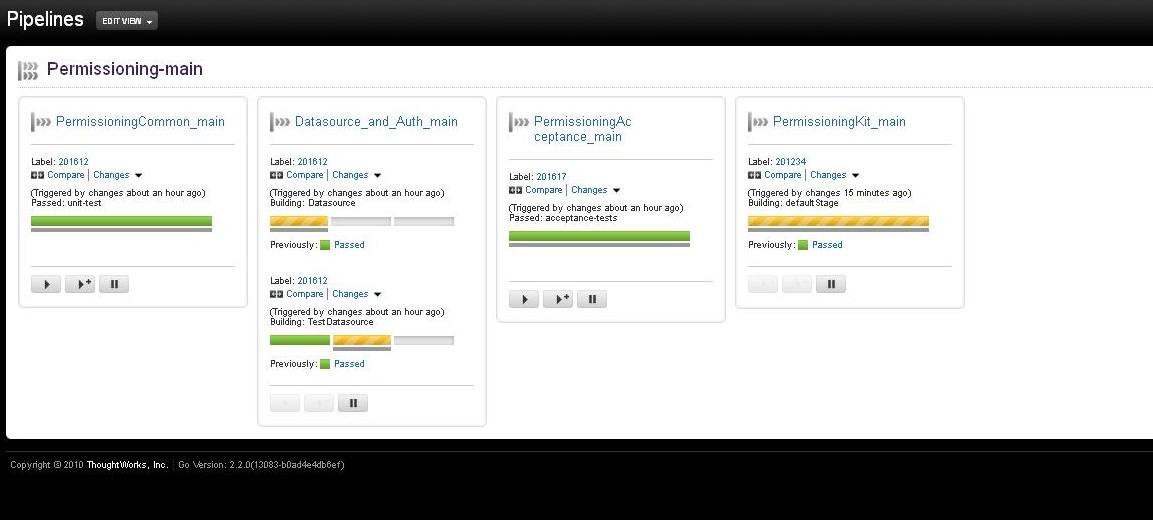
And now we see each build group on screen, one at a time:

This is one pipeline group....

...and this is another

What is in a name? Usually a version number, actually.

Another fascinating topic for you – build versioning! Ok, fun it might not be, but it is important and mostly unavoidable. In an earlier blog I outlined a build versioning strategy I was proposing to use with our Java builds. Since then, the requirements have changed, as they tend to, and so I’ve had to change the versioning convention.

Essentially, what I’m after is a way of using artifact version numbers to tell me some useful at-a-glance information about the artifact I have created. Also, customers want the version number to meet their expectations – that is, when they get a new build, they want to see an easily identifiable difference in the version number between the new build and their old one. What they don’t want is a long complicated list of numbers which are hard to distinguish. For instance, it’s much easy to identify which of the following 2 versions is the latest:

  • 5.0.1
  • 5.0.4

but it’s not so easy to work out which of these is the latest:

  • 5.0.1.13573
  • 5.0.1.13753

As we’re practicing continuous delivery, any given check-in can feasibly produce a release build. So, I would like some way of identifying exactly which check in produced my builds, or at least have a way of working out which bits of source code went into my released package. There are a couple of ways we can do this:

Tag the source code – We could make the builds tag the source code in our SCM system (Perforce) with every build. This is relatively easy to do using Ant and Maven. With Ant there are numerous different ways of doing it depending on your SCM system, for instance, with subversion you need to use the SvnAnt tasks from subclipse (http://subclipse.tigris.org/svnant/svn.html) and basically perform a copy of your source url:

 <copy srcUrl=”${src.url}” destUrl=”${dest.url}” message=”${version.num}”/>

(this is because tags in svn are just cheap copies with a label).

With Maven you just need to use the release plugin – this automatically handles tagging for you.

Tagging the source code is great – it keeps the version numbers as simple as I’d like, and it’s nicely traceable. However, it’s time consuming, and can result in a lot of tags.  The other problem is, I can’t tell which check-in caused the build just by looking at the version number of an artifact.

Use the commit number in the build version – We use a build version of Major.Release.Patch-Build in our artifacts. The build number used to be an auto-incrementing number – this worked fine but it didn’t give us a link back to which commit had caused the build to be made. So, I decided to use the perforce changelist id (i.e. the commit version) as the build number in the version, so that builds would end up looking something like this: 1.0.0-11531.

The problem here is that the version number is not customer friendly – so I remove the build number as a final step, before the builds get released to customers. To track what version the customers have got, I still keep a record of the full build number (including the commit number) in the release notes, and I could also easily inject it into an assembly info or properties/config file if I so wished, so that customers could very easily read out the full version number just by looking in a menu somewhere.

There were several obstacles I had to overcome to get this working. The first obstacle, and really this was the one that stopped me from tagging the source code, was that the maven release plugin is abysmal when it comes to continuous delivery. I needed to use the release plugin to tag the source code, but one of the other things that the maven release plugin does is to remove the word SNAPSHOT, increment the version number, and check the pom back into source control. This would cause another build to trigger in the CI system, which in turn would increment the build number etc and cause another build to trigger – so on and so on. Basically it would create a continually building project.

So I have decided not to use the maven release plugin at all – it doesn’t seem to fit in with Continuous Delivery. In order to create potential release candidates with every successful build, I’ve removed the word SNAPSHOT from all the poms, so we aren’t making any snapshot builds anymore either (except when you build locally – more on that later). The version in the poms now takes the P4 commit number, which is injected via the Continuous Integration system, which in my case is Go. Jenkins also supports this, using the subversion plugin (if you use subversion), which sets an environment variable with the svn revision number (more details here). The Jenkins Perforce plugin does the same thing, setting the P4_CHANGELIST environment variable – so it can easily be consumed (more details here).

Go takes the P4 changelist number and puts it in an environment variable called “GO_PIPELINE_LABEL”. I read this variable in, and assign it to a property called p4.revision. I do this in the command that kicks off the build, so that it overwrites a default value which I can keep in my pom – this is useful because it means my colleagues and I don’t have to make any changes to the pom if we want to run a build locally (bear in mind if we run it locally this environment variable won’t exist on our PCs, so the build would otherwise fail). Here’s a basic run down of a sample pom, with more details to follow:

<modelVersion>4.0.0</modelVersion>
<groupId>etc.so.forth</groupId>
<artifactId>MyArtifact</artifactId>
<packaging>jar</packaging>
<version>${main.version}-${build.number}</version>

<description>Description about this application</description>

<properties>
<p4.revision>SNAP</p4.revision>
<build.number>${p4.revision}</build.number>
<main.version>5.0.2</main.version>
</properties>

<scm>

</scm>

<repositories>
<repository>
<snapshots>
<enabled>false</enabled>
</snapshots>
<id>release-candidate-repo</id>
<url>http://artifactory.me.com/my-rc</url&gt;
</repository>
</repositories>

<build>

</build>
</project>

The value for p4.revision is “SNAP” by default, meaning that if I make a local build, I’ll get an artifact with the version 5.0.2-SNAP. I know that these builds should never be promoted to production or handed to customers because the word SNAP gives it away.  However, when a build is created by the CI system, the following command is passed:

clean deploy sonar:sonar -Dp4.revision=${env.GO_PIPELINE_LABEL}

This overwrites the value for p4.revision, passing in the Perforce commit number, and the build will create something like 5.0.2-1234 (where 1234 is my imaginary p4 commit number).

I’ve added a property called main.version, which is the same as the full version but without the build number. I’ve done this so that I can package up my customer builds (ina  zip) and label them with the version 5.0.2. After all, customers don’t care about the build number.

An important policy to follow is once a build is released to a customer, one of the other version numbers MUST be increased, meaning all further builds will be at least 5.0.3. The decision of which version number to increase depends on various business factors – I like to increase the 3rd number if I’m releasing a patch to a previously released build. If I’m releasing new functionality I increase the second number. The first number gets increased for major releases. The whole issue of version numbers becomes a lot less complicated if you’re in the business of releasing software to web servers and you don’t actually have to hand software over to customers. In this instance, I just keep the full version number with the build number at the end, as it’s usually someone like me who has to look after the production system anyway!

Exclude pom file from jar using maven jar plugin

I’m using the maven jar plugin, and I want to exclude the pom file from our resultant jars. The obvious choice would be to have an “excludes” section in my jar plugin configuration, like this:

<plugin>
<groupId>org.apache.maven.plugins</groupId>
<artifactId>maven-jar-plugin</artifactId>
<version>2.3.1</version>
<configuration>
<excludes>
<exclude>**/pom.xml</exclude>
</excludes>
</configuration>
</plugin>

Obvious, but wrong. Then I read that there’s an “excludePomFiles” flag which you can set to true, so I tried that, and that didn’t work either.

The solution was to use the MavenArchiveConfiguration’s “AddMavenDescriptor” method, like this:

<plugin>
<groupId>org.apache.maven.plugins</groupId>
<artifactId>maven-jar-plugin</artifactId>
<version>2.3.1</version>
<configuration>
<archive>
<addMavenDescriptor>false</addMavenDescriptor>
</archive>
</configuration>
</plugin>


Are Tools and Processes Stifling Our Creativity and Productivity?

I had lunch with my friend Christian the other day (we went to wagamamas, I had Ginger Chicken Udon – delicious) and he was telling me about a company who work according to what sounded very much like developer anarchy – basically everyone is allowed to go their own route, use whatever tools or languages they please, using any framework they want to, to deliver projects. This sounded like fresh lunacy, and I couldn’t get past how much of a nightmare it must be as a build/release or sysadmin guy, to make all of that come together and then look after it.

http://centennialsociety.com/business_reply/businessreply.htm

Developer Anarchy

However, it did get me thinking about the tools and frameworks that I’ve used over the years, and whether they were too restrictive. That led me on to thinking about some of the business processes I’ve worked with, and how counter-productive they could be too. So I decided to list some of these tools, processes and frameworks, and critique them with respect to how inflexible and restrictive they can be.

Maven and Ant

Rather predictably, I’ll start with Maven. Maven is both a build tool and a framework, it uses plugins to hide the complexities of the tasks it performs “behind the scenes”. Rather than explicitly coding out what you want to compile, or what unit tests you want to run, Maven says “if you put your files here, and call this plugin, I’ll take care of it”. Most of the Maven plugins are fairly configurable, but only to an extent, and you have to consult the (very hit-and-miss) documentation every time you want to do something even slightly off the beaten path. It very much relies on the “convention over configuration” principle – as long as you conform to its convention, you’ll be fine. And it’s this characteristic which inevitably makes it so restrictive. It’s testament to how difficult it is to veer from the “Maven way” that I almost always end up using the antrun task to call an ant script to do most of the non-standard Maven things that I want to do with my builds. For instance, I currently have a requirement to copy my distributable to 2 separate repositories, one with some supporting files (which need to be filtered) and one without. This isn’t a particularly weird requirement, and you can probably do it with Maven, but despite the fact that I’ve worked with Maven on a daily basis for over 3 years, I still find it much easier to just call Ant to do stuff like this, rather than write my own plugin or go trawling through Maven’s online documentation.

Dev Team Ring-Fencing

I have worked in companies where discussion and interaction between development and QA/NetOps etc have actively been discouraged. The idea behind this insanity has been to give the developers time to do their work, without being constantly interrupted by testers, release engineers etc and so on. I can just about understand how this can happen, but I can’t really understand how someone can come to the conclusion that ring-fencing a whole team and discouraging interactions with other teams is a sustainable and sensible solution. The solution should be to find out exactly WHY the QA or NetOps team need to constantly interrupt the developers. Being told that you can’t talk freely with other teams develops business silos which can be very hard to break down, and also prevents people from getting the information they require, which can seriously impact productivity.

Audits

If I had a pound and a pat on the head every time I heard the phrase “we can’t do that, it would never get past the auditors”, by now I’d be a rich man with a flat head. Working in build and release engineering, I quite often get caught up with security and audit issues when it comes to doing deployments – what account should be used to do deployments to production? How often should passwords be changed? How do we pass the passwords? Are they encrypted? What level of access should release engineers have to the codebase? All of these questions come up at one point or another. In my experience, developers, sysadmins, managers and the like, will always come back with “you can’t do that, it’ll never get past the auditors” whenever you propose a new or slightly radical way of doing things, it’s like their safety net, and I think it’s just their way of saying “we don’t like that, it’s different, different is bad”. My suggestion is to speak with the auditors and challenge what you’ve been told. If that’s not possible, try to find out exactly what rule you’re breaking and then find out what the guidelines for compliance are on the rule in question – google is remarkably good for this, so are forums and meetups. In my experience, most of the so called compliance rules are not nearly as draconian or restrictive as many of my own colleagues would have me believe.

Meetings

Oh my god. So many meetings. I now hate pretty much all meetings. Prior to working at Caplin Systems I think my job was to attend meetings all day. I can’t really remember, I can’t actually remember a time before meetings.

The worst meetings of all are the “weekly status meetings”. I don’t know if these are widely popular but if they are, and you have to attend them, then you have my sympathies. They amount to a lot of people talking about stuff that’s already happened. Quite a lot of it has nothing to do with you, and absolutely all of it could be communicated more efficiently without needing a meeting. Also, someone takes notes. Taking notes in a meeting about stuff that’s already happened so that they can tell everyone else about what happened in a meeting about stuff that’s already happened. The pain is still raw. Don’t do this, it’s stupid. Do demos instead, they’re more interesting and we actually get to SEE stuff, rather than just hear someone droning on about stuff they’ve already done. Meetings are not productive, and they stifle my creativity by making me want to go to sleep.

MS Project

“You have to work on this today, and it has to take you eight hours, and then you have to work on a different project for 50% tomorrow, and then you have to work on bla bla bla”. No. Wrong. This is totally unrealistic. You only have to be out by 10% with your LOE (Level of Effort, or SWAG “Sophisticated Wild-Arsed Guess”) to throw the whole thing into disarray. Be sick for a day and they system is in free-fall, one project needs to shift by 1 day and suddenly you’re clashing with all these other projects and you’re assigned to work a 16 hour day. MS Project is often the tool of choice for companies who follow the Waterfall process, and it’s probably the process as much as the tool itself which causes this mess, but the tool certainly doesn’t help. I prefer to use tools that allow me to manage my time on a 2 weekly basis (like Acunote, see here), the decision of when I should work on each task is determined by me and the team I’m working with, and it has worked very successfully so far.

Source Control Systems

Aside from Visual Source Safe, I’ve never worked with a truly awful SCM. They all have really neat features and at the end of the day they perform an exceedingly important job. However, the everyday use of these tools varies from one to another, and some are more restrictive and controlling than others. For instance, Perforce, which has long been one of my favorites, only allows you to have 1 root for your client spec – this is a pain in a CI system if you can’t tell your server to swithch clientspec (or workspace). I’m currently working with Perforce coupled with Go as the Continuous Integration server, and Go forces me to check out my files to “C:\Program Files\Cruise Agent” but my build has a requirement to also sync some files to D:\. This can’t be done with Perforce because you can only have one root directory (in this case C:\).

I like SCM systems where it’s easy to create branches. I’m a big fan of personal branches, somewhere to check-in my personal work, POCs, or just incomplete bug fixes that I’d like to check-in somewhere safe before I go home. Subversion and Git make this easy, and they also allow you to merge your changes to another branch. I personally find Subversion better at this than Perforce, but that might just be me (I get confused with Perforce’s “yours” and “theirs”). SCM systems that allow for easy branching are far less restrictive, and encourage you to try something different, without having to worry about checking in to the main branch and breaking everything.

Continuous Integration Systems

C.I. systems can really get in the way of your productivity if they:

  • Take ages to setup a build job – How can I be productive if I’m spending so long creating a build job, or waiting for one to be made?
  • Keep reporting false-negatives – How can I be productive if I’m always looking into a failing build which isn’t really failing?
  • Don’t provide a friendly interface
  • Don’t provide you with the information that you need!

A good C.I. system should be a service, and a hub of information. It should be easy to copy build jobs or create new ones and it should provide all users with a single point of reference for all the build output, like test results and static analysis results. At a previous job, Pankaj Sahu, the build engineer, setup a system of automatically creating build jobs in Bamboo using Selenium and Ant, it was brilliant. Bamboo also allows you to copy jobs, which is in itself a real time saver. Jenkins also has a similar feature. Go, which is a good C.I system is slightly harder work, but it’s main advantages lay elsewhere.

The Boy Who Cried Wolf – Why Broken Builds Must Not Be Ignored!

We’ve all heard the fable of the boy who cried wolf, an old tale written by a Greek slave who lived a long time ago and liked telling stories. I must stress thought that this was just a story, but like many good stories (Star Wars, Gremlins 2) it’s based on true events. It’s a little known fact (which I have just made up) that the story of the Boy Who Cried Wolf is actually based on an ancient Continuous Integration system (possibly belonging to Spartatech inc, a leading software development company of from around 600BCE).

The are only very sketchy records of what actually happened during this historical event, but here’s what we know for sure*:

  • The Continuous Integration system compiled code and ran unit tests.
  • The unit tests were followed by acceptance tests, which in turn were followed by integration tests.
  • The integration tests were followed by cross-platform tests.

One day, the C.I. system alerted the developers, and anyone else who would listen, that one of the builds was failing!

THE BUILD IS FAILING!!!!!!

THE BUILD IS FAILING!!!!!!

All the workers gathered around the C.I. system to take a look at the error, only to discover that in actual fact, the problem was that the machine on which the tests were running had restarted, thanks to a windows update! The developers went back to work and thought no more of it.

The very next day, the C.I. system went ballistic again, alerting the developers of yet another failure. Once again the team took notice and looked into the error. This time they discovered that the test machine was running slowly and their unit test had timed out. They restarted the machine and it all passed.

By the following week, the C.I. system had alerted the team to 5 other “failed” builds, which were simply a result of the test servers behaving oddly, and no change to the code was required at all. By the end of that week the dev team had stopped paying attention to these alerts, because they all had proper jobs to do, and a lot of work to get through by the end of the sprint (they were agile, even back then – so if you still work according to “Waterfall” THAT’S how far behind the times you are).

Then, one day, a developer checked in a piece of code which failed a unit test. The C.I. system rightly alerted the development team again, but this time nobody came running, in fact, nobody paid the blindest bit of notice. They were all so used to ignoring the C.I. system that when a real problem finally arose, it wasn’t picked up by anyone. Anyway, cutting an already long story a bit shorter, the bug was a biggie, and the next release of their software was so poor that Spartatech inc, the biggest employer in Sparta, went out of business making everyone redundant. This is what basically led to the collapse of Sparta, not sure if you knew that. And here concludes your exceedingly dodgy history lesson.

Back to the present-time: We all know that false-negatives are the enemy of a good Continuous Integration system, they lead us down a path from which it’s increasingly hard to recover. The problem is that it’s just so easy to get into that situation.  Thankfully, there are a few “Continuous Integration best practices” which we can follow, which can help us keep our system in good nick:

  • Make sure the servers on which you run your builds are cleaned regularly, preferably before every build. I would suggest a clean image be deployed each morning. This obviously means that deploying and configuring your system will need to be automatic.
  • Use tools such as VMWare, VirtualBox etc to manage your Virtual Machines.
  • Use tools like Puppet, Chef and Vagrant to automate the deployment and configuration of these VMs.
  • Add the deployment of the VMs to your C.I system!
  • If there are any randomly failing tests, which also randomly fail on your local machine, remove them or rewrite them to make them more reliable.
  • When doing sprint planning, make sure time is dedicated to investigating and fixing broken or flaky builds. It’s very important to ensure the Product and Project Managers are aware of the importance of the C.I. system, and the risk of not maintaining it properly.
  • Treat the rules of Continuous Integration as sacrosanct – if a build fails, fix it as soon as possible.

In an earlier post I wrote about the difference between having a Continuous Integration server and practicing Continuous Integration. If you start to get into the situation where you’re allowing broken builds to go un-fixed, you’re slowly slipping away from actually practicing continuous integration, and soon you’ll just be a development team who has a continuous integration server which is delivering much less value than it ought to.

*I may have got my chronology a little mixed up

Nant NUnit and FxCop Build Script

Here’s a nant script I’ve knocked up which does the following:

  • Compiles the solution in debug
  • Moves the Unit test dlls into a single common folder
  • Applies Unit tests
  • Generates reports
  • Runs an FxCop analysis
  • Outputs the FxCop analysis to an xml file

I’ve used this build script in a continuous integration system that doesn’t actually publish any code. The purpose of this system is to run the unit tests and the code analysis quickly so that feedback can be obtained as early as possible. I’ve reused most of this script in the nightly build, which actually deploys the resulting code to a test server. The main difference is that the build is done in release maode in that instance. Anyway, here’s the script:

<?xml version=”1.0″ encoding=”utf-8″?>
<project name=”Unit tests” default=”run”>

<property name=”namespace” value=”MyProjectName” />
<property name=”test.dir” value=”.\UNITTESTS” />
<property name=”nant.settings.currentframework” value=”net-2.0″ overwrite=”false”/>
<property name=”output.dir” value=”c:\output” overwrite=”false”/>
<!– fxcop props –>
<property name=”fxcop.basedir” value=”C:\FxCop” />
<property name=”fxcop.executable” value=”${fxcop.basedir}\fxcopcmd.exe” overwrite=”false”/>
<property name=”fxcop.template” value=”${fxcop.basedir}\Template.FXCop” overwrite=”false”/>
<property name=”fxcop.out” value=”${output.dir}\${namespace}.fxCop.xml” overwrite=”false”/>

<target name=”compile”>
<msbuild project=”${namespace}.sln” >
<arg value=”/property:Configuration=Debug”/>
</msbuild>
</target>

<target name=”move” description=”moves the unittest dlls into a single common folder”>
<mkdir dir=”${test.dir}” />
<copy todir=”${test.dir}” includeemptydirs=”false” flatten=”true”>
<fileset basedir=”..\”>
<include name=”**\*UnitTests.dll” />
</fileset>
</copy>
</target>

<target name=”test” depends=”compile” description=”Apply unit tests”>
<property name=”nant.onfailure” value=”fail.test”/>

<nunit2>
<formatter type=”Xml” usefile=”true” extension=”.xml” outputdir=”${output.dir}” />
<test>
<assemblies basedir=”${test.dir}” >
<include name=”*UnitTests.dll”/>
</assemblies>
</test>
</nunit2>

<nunit2report out=”${output.dir}\${namespace}.html” >
<fileset>
<include name=”${output.dir}\*.dll-results.xml” />
</fileset>
</nunit2report>
<property name=”nant.onfailure” value=”fail”/>
</target>

<target name=”fail.test”>
<nunit2report out=”${output.dir}\${namespace}.html” >
<fileset>
<include name=”${output.dir}\*.dll-results.xml” />
</fileset>
</nunit2report>
</target>

<target name=”cop”>
<echo message=”Running FxCop Analysis”/>
<exec program=”${fxcop.executable}” commandline=”/p:${fxcop.template} /f:${test.dir}\*.dll /o:${fxcop.out} /s” failonerror=”false”/>
<!–<echo message=”Logging Analysis Results”/>
<fxcoplogger dbserver=”myDbServer” dbname=”CodeAnalysis” trustedconnection=”true” />–>
</target>

<target name=”run” depends=”compile, move, test, cop”>
</target>

</project>

One thing you might note is that there appears to be a bit of replication of the same code, namely the nunit2report. But if you follow the logic, you’ll see the reason for this. We don’t want the build to stop processing if one of the unit tests fail, we actually want to capture the results, carry on, and present them in the build report. So what you do is add this line:

<property name=”nant.onfailure” value=”fail.test”/>

This tells the the script to go to the fail.test target, only if the build fails. This target generates the nunit2report, thus:

<target name=”fail.test”>
<nunit2report out=”${output.dir}\${namespace}.html” >
<fileset>
<include name=”${output.dir}\*.dll-results.xml” />
</fileset>
</nunit2report>
</target>

However, I still want to see the nunit2report even if the build doesn’t fail, so I have put a copy of the same target inside the test target, this means that if the unit tests fail or pass, I get my report, and if the tests pass, the build process carries on to do an FxCop analysis.

I think the outline of this system is covered in a book called Expert .Net Delivery by Marc Holmes, which is a great resource for getting up and running with Nant. It was the first book I bought when I started using Nant, and I recall it covered the fundamentals very well. It’s a pity the title doesn’t have “Continuous Integration” in it, because it’s actually a good place to start when setting up a .Net based CI system too.

Speaking of CI – if you use CruiseControl.Net there are handly transforms for getting your FxCop and Nunit reports published alongside your build on the CI dashboard. Alternatively you can hack the CruiseControl.net dashboard and provide a customised link to the nunit2report’s output html – it all depends on which format you prefer. I can’t decide, so I have both!

Continuous Integration: The Last Mile

Conquering the Last Mile

I went to the London C.I. Meetup last week where Gus Power (how he chose a career in I.T. and not as a pro-wrestler with a name like that I do NOT know) delivered a talk entitled “C.I. The Last Mile”. Gus seems to have a comprehensive and varied background in lean and agile software engineering and delivery, and in this session he talked to us about “Conquering the last mile”, that is, getting working software out of the door.

This is NOT Gus Power

This is NOT Gus Power

We’ve all heard (or maybe even said a few times) the oft repeated mantra “but it works fine on my machine!”. This situation is commonplace, a build, for instance, will run just fine on your own PC, but as soon as it runs on the build server, it fails. Gus reminds us that, although this scenario is common, it’s a million miles away from working, releseable software, for a number of reasons, and that the only true definition of “working” software is “running, tested, and in the hands of the customer”.

Continuous Integration – is it Just a “Software” Practice?

Continuous Integration as a practice is traditionally quite a few steps removed from the world of running, tested software in the hands of the customer. In fact, Gus suggested that C.I. is usually associated with automating builds and running unit tests (although I would suggest that this is probably an increasingly naive view in this day and age, but for the sake of his talk it helped to make a point). This is obviously a long way away from delivering working software to a customer. Gus told us of his own company’s realisation that software, in their case, was not the product, and that their “product” included a lot more than just the software that the dev team delivered. He was of course referring to the supporting software and systems, and infrastructure.

Think of a web-based company, for instance Uswitch.com (for whom I used to work). While their core product may be a lot of web pages and associated content, their overall system consists of a lot more – for instance, there’s the IIS configurations, the data in the databases, the load balancers and of course the infrastructure (servers, Operating Systems etc). Note that Continuous Integration, in many cases, doesn’t cover most of this supporting system, only the company’s proprietary software (including the database in the case of Uswitch.com – at least, that was the case a few years ago when i worked there).

Gus pointed out that all these other parts of the system should also be brought under the watchful eye of Continuous Integration, and I agree with him wholeheartedly.

Lean Manufacturing

Gus went on to introduce us to the Lean Manufacturing model as used by Toyota.

Image: Toshifumi Kitamura/AFP/Getty

He said that Toyota enjoy a great deal of success due to their use of a system based on tolerances, rather than rigid specs. He seemed to suggest that this approach could be applied to some of the non-software aspects of a system, such as infrastructure.

Acceptance Criteria for Systems

I think Gus raised a particularly interesting point about the lean manufacturing system, and it made me think about how much attention we usually pay to “acceptance criteria”. In the current agile environment, much attention is focused on what constitutes “acceptance” when it comes to designing and delivering software. Many tools exist, such as Fitnesse and Cucumber, which allow us to capture acceptance criteria in relation to a user story or use case. However, while this practice is now common across many software companies, the focus tends to be on the software that’s being developed, and often doesn’t include the supporting parts of the system, such as the infrastructure (hardware, load balancers, data, etc and so forth).

cucumber - behaviour driven development with elegance and joy

Of course, there’s an obvious reason for this. Most of the stories come from user requirements, the stories are made into tasks and the tasks are worked on by the software engineers. There’s a disconnect between those responsible for delivering the software (i.e. the software engineers) and those responsible for the supporting systems (who are they anyway???). Also, the customer’s requirements are often agnostic when it comes to the supporting parts of the system – they generally don’t care about the load balancer’s capabilities, or what type of web server you use).

What we’re talking about here is the difference between “software requirements” and “system requirements”, and how the latter are quite often overlooked, or at least overshadowed by the former.

Software Acceptance vs Product Acceptance

Gus finished off his talk by recommending that all parts of your “product” (I prefer the term “system” here, but that’s just me) should be brought under the control of your C.I. system and that there should be some effort to capture and measure system acceptance criteria – here he refers back to the Toyota system of using tolerances.

I raised the subject of Chef & Puppet in the Q&A session at the end. These tools allow you to treat what are traditionally considered “infrastructure” parts of your system as code. With these tools you can easily script up and deploy VMs and Operating Systems along with their configurations,  and they also work well in a C.I. environment. Gus said that he has enjoyed some success with Chef.

This is not the chef we were referring to

This is not the chef we were referring to

Maven Assembly Plugin Filtering Part 2

We want to copy some documents, namely a releasenote.txt, into a doc directory inside the zip file that our build creates. I’m using the assembly plugin to create the zip file, and the assembly descriptor specifies the release note file to copy and filter

The tokens I’ve got in the release notes are:

  • @version@
  • @currentdate@
  • @build.number@

And I have defined the values in the pom:

<currentdate>${maven.build.timestamp}</currentdate>

<build.number>${p4.revision}</build.number>

<version>5.0.0</version>

Now, if I copy the release note using the maven resource plugin, which by default copies resources to the classes output directory, the filtering works fine. This is how I defined it in the pom:

<resources>
<resource>
<directory>src/main/resources</directory>
<filtering>true</filtering>
<includes>
<include>RELEASENOTE.txt</include>
</includes>
</resource>
</resources>

Unfortunately I don’t want to copy it to the classes directory, I want it to go in the zip assembly, in a docs directory, hence the definition in the assembly descriptor (called kit.xml). The full kit.xml can be seen at the end of this post. So, the suggested thing to do is specify the file you want to copy, and set <filtered> to true, like this:

<file>
<source>src/main/resources/RELEASENOTE.txt</source>
<outputDirectory>doc</outputDirectory>
<filtered>true</filtered>
</file>

Of course, it doesn’t work. And here’s why – unlike the maven resource plugin, the assembly plugin’s filtering doesn’t seem to work with tokens in the @bla@ format, but instead insists on using ${bla} instead. And not only that, but it won’t read my properties and values that I’ve defined in my pom either, it requires you to create a filter.properties file which defines variables/values in the style:

variable1=value1

variable2=-value2

Obviously I don’t want to do that, I’ve already got them defined in my pom and I hate duplication (think DRY principle!). So that left me with 2 options. I could explicitly define the maven resource plugin, like this:

<plugin>
        <artifactId>maven-resources-plugin</artifactId>
        <version>2.5</version>
        <executions>
          <execution>
            <id>copy-resources</id>
            <phase>prepare-package</phase>
            <goals>
              <goal>copy-resources</goal>
            </goals>
            <configuration>
              <outputDirectory>some/other/dir</outputDirectory>
              <resources>
                <resource>
                  <directory>src/main/resources</directory>
                  <filtering>true</filtering>
                </resource>
              </resources>
            </configuration>
          </execution>
        </executions>
      </plugin>

and tell it to copy my releasenote.txt file to some directory, and do the filtering on it in the process, and then bind it to a phase which happens before my assembly plugin is called (as shown above). I would then need to change my assembly descriptor to tell it where to find the new, properly filtered releasenote.txt file and copy it to the doc dir, like this:

<file>
<source>src/main/resources/RELEASENOTE.txt</source>
<outputDirectory>doc</outputDirectory>
<filtered>true</filtered>
</file>

An alternative, and this is the one I went for, is to let the maven resource filtering copy the file from src/main/resources into the target/classes directory as it does by default, and then tell the assembly descriptor to copy it from there to the doc directory:

<file>
<source>src/main/resources/RELEASENOTE.txt</source>
<outputDirectory>doc</outputDirectory>
</file>

It’s far from ideal and it’s very annoying that the maven assembly plugin does filtering differently, but in the end it gets the job done.

My full assembly descriptor, kit.xml:

<assembly>
<id>kit</id>
<formats>
<format>zip</format>
</formats>
<fileSets>
<fileSet>
<directory>src/main/resources</directory>
<outputDirectory>doc</outputDirectory>
<includes>
<include>*.*</include>
</includes>
<excludes>
<exclude>latest.properties</exclude>
<exclude>RELEASENOTE.txt</exclude>
</excludes>
</fileSet>
</fileSets>
<files>
<file>
<source>target/classes/RELEASENOTE.txt</source>
<outputDirectory>doc</outputDirectory>
<filtered>true</filtered>
</file>
<file>
<source>target/${artifactId}-${version}.${packaging}</source>
<outputDirectory>/</outputDirectory>
<destName>container-filtering-module.jar</destName>
</file>
</files>
</assembly>

Maven Release Plugin and Continuous Delivery

I was setting up a Continuous Delivery system using Maven as the build tool, Perforce as the SCM and Go (ThoughtWorks’ CI system). All was going perfectly well until I got to the point when I no longer wanted to make snapshot builds…

The idea behind my Continuous Delivery system was this:

  • Every check-in runs a load of unit tests
  • If they pass it runs a load of acceptance tests
  • If they pass we run more tests – Integration, scenario and performance tests
  • If they all pass we run a bunch of static analysis and produce pretty reports and eventually deploy the candidate to a “Release Candidate” repository where QA and other like-minded people can look at it, prod it, and eventually give it a seal of approval.

As you can see, there’s no room for the notion of “snapshot” and “release” builds being separate here. Every build is a potential release build. So, a few days ago I went right ahead and used the maven release plugin, and that was the last time I remember smiling, having fun, getting a full night’s sleep, and my brain not hurting.

The problem is this: the maven release plugin doesn’t really work for continuous delivery. And what’s more, it REALLY doesn’t work with Go and Perforce. I’ll start with the Go/Perforce issues: I got loads of errors thanks to the way Go runs as the system user, and creates its own clientspecs. The results of this debacle are detailed here and here.

I managed to finally get around the clientspec/P4/Go problems with some help from my colleague Toby Catlin who bears the scars of similar skirmishes with Go and Perforce from days gone by. The “fix” was to create a perforce config file and an “uber” client spec. The perforce config file specified the uber clientspec and it lived in the root of the project directory. It was hardly a satisfactory workaround, as it meant that every project would need to have this file, and the uber clientspec would need to be updated every time a new build job was created. But never mind that, it was just a relief to see the builds going green for a change.

And that’s when it happened… the release build completed. The maven release plugin increased the version number in the pom and checked it in. And then Go detected the change in the pom and checked it out again and started building again. This then updated the version number and checked it in, which in turn got detected and kicked off another build CAN YOU SEE THE GLARINGLY OBVIOUS PROBLEM HERE????

It’s obvious really. I’ve always made my maven release builds a manual process in the past and that was exactly why, I’d just forgotten all about it. So, I’ve decided not to use the maven release plugin at all. Every build now just creates a “release” build because I’ve removed all instances of the word SNAPSHOT from the poms. If they pass all their tests and look good enough, they’re automatically promoted to the release candidate repository. And everyone’s happy. Also, I’ve added a property to the builds which pulls in a variable from the Go system, and if that’s not present the “deploy to release candidate repository” step fails – this is to stop developers from manually creating releases – all release builds must come from the CI system.

Maven Release Plugin and Perforce Clientspecs

I’m getting a very annoying error trying to do maven release builds on our CI servers, which isn’t appearing on my local workstation. The build seems to fail because the pom file is under source control (I’m using Perforce) and so it’s read-only. However, It should check out the pom file so that it isn’t read only. Alas, that doesn’t seem top be working. Here are the errors I got initially:

[ERROR] BUILD ERROR
[INFO] ————————————————————————
[INFO] Error writing POM: C:\Program Files\Cruise Agent\pipelines\yadda\yadda\pom.xml (Access is denied)

The reason behind it appeared to be:

[ERROR] CommandLineException Exit code: 1 – Client ‘xpcruisebuildvm1-STANDARD-ALL’ can only be used from host ‘xpcruisebuildvm1’.

Command line was:p4 -d “C:\Program Files\Cruise Agent\pipelines\yadda\yadda” -p perforce.mycompany.com:1666 ed
it pom.xml
org.codehaus.plexus.util.cli.CommandLineException: Exit code: 1 – Client ‘xpcruisebuildvm1-STANDARD-ALL’ can only be used from host ‘xpcruisebuildvm1’

So the first thing I did was create a new clientspec for that machine which had all the files mapped to its c:\temp directory, and then tried to run the build again, assuming this would fix the issue but present me with a whole new problem about how to fit this all in to my CI system. However, this also failed:

[ERROR] BUILD ERROR
[INFO] ————————————————————————
[INFO] Error writing POM: C:\TEMP\yadda\pom.xml (Access is denied)

This is confusing because the clientspec I’m using does have these files in its view and therefore Maven should be able to edit them. Also, this is how I have it setup on my local workstation, and that works fine…

After a lot of trial and error I managed to make some progress. One of the issues was that the client spec had the following mapping in it:

//JavaDevelopment/main/yadda/… //XPCRUISEVM808_release/temp/yadda/…

and the root was set to C:\

This means all P4 files should sync to my C:\TEMP directory, which already existed on the machine. As expected, the sync worked fine and all files appeared in C:\TEMP\yadda.

And therein lies the rub: the client spec uses lowercase “temp”, while the windows directory was uppercase “TEMP”. As simple as that. I changed the client spec to math the filesystem and for good measure updated my release plugin version to 2.1. Problem solved (well, actually that presents me with a whole new problem because I don’t want every build agent to have different client specs, because I’m using Go, and that puts them in it’s own directory under the name of the build job. Grrrr).