Test-Driven Infrastructure with Chef – Book Review

A while ago I ordered a copy of “Test-Driven Infrastructure with Chef” from Amazon. It must have been sometime last summer in fact. It took months to arrive, because they simply didn’t have enough copies. So when it finally did arrive, I was very excited to see if my wait was worth the, er, wait.

Written by Stephen Nelson-Smith (he of @LordCope twitter fame and author of the excellent Agile Sysadmin blog), Test-Driven Infrastructure with Chef is by no means “War And Peace”. In fact it’s pretty tiny, and looks more like a pamphlet than a book. But what it lacks in size it more than makes up for in concise content.

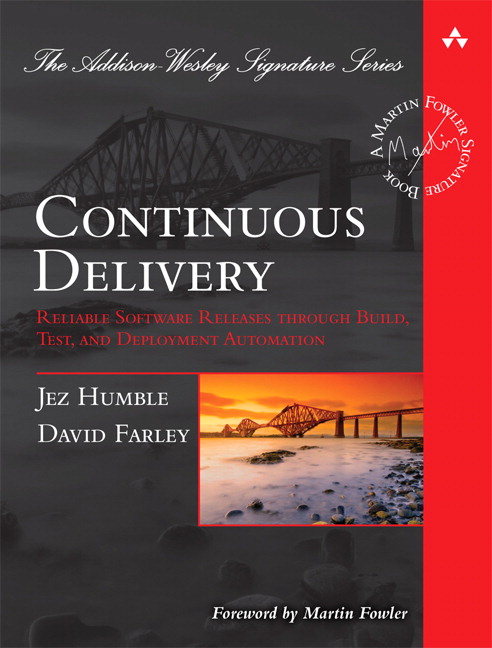
What I really like about this book is that it feels absolutely perfect for someone like me, and by that I guess I’m trying to say that the target audience is well thought out. It’s aimed at Developers, Ops Engineers, DevOps, Sysadmins and Release engineers, those sorts of people. It assumes you know a certain amount about your own business, and so I don’t find myself sitting there reading some really basic stuff that anyone in my line of work is bound to know already. I’ll take the Continuous Delivery book as an example – it’s a great book, but some of it is about introducing Continuous Integration! I would have thought that if you were about to embark on Continuous Delivery, the first thing you’d already be VERY comfortable with would be C.I. so why the need to cover that all over again? Besides, there are plenty of good C.I. books on that subject. Of course, I know that the Continuous Delivery book is in actual fact aimed at a much wider audience, but what I’m trying to say here is that Test-Driven Infrastructure with Chef is more targeted, and I feel it’s a much easier read for it.

Infrastructure as Code

The fundamental premise of this book, and indeed the main point of Chef itself, is that we should treat infrastructure as code. What this means is that managing, designing, deploying and testing infrastructure should be done in an analogous fashion to how we do these same things with software. The code that  builds, deploys and tests our infrastructure should be committed to source-control in the same way as the code that builds, deploys and tests our software is.

This approach brings with it many of the same principles as we have around building, deploying and testing our software, and these are listed in chapter 1. Also listed here are the advantages of treating your infrastructure as code, things such as repeatability, automation, agility, scalability, disaster recovery and very importantly, reassurance!

The book goes on to introduce the reader to Chef. Chef is an open source tool for managing, deploying and configuring infrastructure. It’s produced by Opscode – check out the website for more information. The book explains about the Chef tool, framework and API, and then goes on to give instructions on how to install it (you’ll need Ruby installed – and the book covers this, using RVM). You’ll also get an introduction to Git (and GitHub) here too, and how to install Git on Ubuntu. Incidentally, all the examples are based on an Ubuntu system, so if you follow the examples closely, it’s best to have Ubuntu, or an Ubuntu vm at hand. That’s not to say that the examples can’t be done on other systems, but I would guess that centos would require a lot more behind-the-scenes configuring, thanks to its less-than-fantastic package repositories.

Cucumber-Chef

Chapter 4 provides a nice introduction and description of Test-Driven and Behavior-Driven Development, and talks a little about the Acceptance Test automation tool Cucumber, before chapter 5 goes into some more detail about Cucumber-Chef (don’t worry if you haven’t heard about this before, the book tells you all you need to know to get started, but for now let’s just say it does for infrastructure what Cucumber does for code).

I couldn't find the logo for cucumber-chef, so here's a picture of a cucumber...

...and chef

Chapter 5 introduces us to the Amazon EC2 Web Service. It shows you how to get setup with a personal account (which is nice and easy), because you’ll need it to work through the examples that follow! This is one of the things that I like most about this book, it’s a practical guide, it’s as if the author knew (which he obviously did) that his target readers are the types of people who like to get stuck in and do stuff. Chapter 5 finishes off with instructions on installing Chef and using a couple of the built-in tasks.

Recipes, Roles and Cookbooks

It’s chapter 6 and time for a worked example using cucumber-chef. This is where we first meet Recipes, Roles and Cookbooks. First, we learn how to do cucumber style Given, When, Then Acceptance tests, and we start TDDing. This chapter really is about how to apply test-driven development to an operations solution. Requirements are gathered, Acceptance criteria are identified, Acceptance Tests are written (before we actually do any Chef scripting, as per TDD), and we follow the “Red, Green, Refactor” model until we have a working solution. In my copy there’s a glaring mis-print on page 48, where the given, when, then example ends up being “given, when, when” 🙂 Hopefully this’ll get corrected in future editions.

The final chapter underlines how managing our infrastructure as code, and applying the principles of test-driven development can help us increase our quality and reduce the usual risk associated with deploying infrastructure.


Conclusion

This book will serve as a great introduction to Chef for anybody who learns best via hands-on examples. But it’s much more than an introduction to Chef, it’s really about the practice of test-driven development, and about how to apply the principles of TDD to infrastructure management.

Using Chef in itself is a step in the right direction – it allows us to treat infrastructure as code, and this has so many benefits – we can version our configurations much more easily, we can store our configurations in a proper source code management tool, we can deploy configurations sensibly, and so on. And applying TDD principles to your Chef “development” obviously looks like a great idea, it brings with it all the goodness of TDD, and gets us to think in terms of requirements and acceptance criteria before we start building our systems, ensuring that what we produce is fit for purpose.

Even if you don’t follow TDD, or don’t plan to follow TDD for your infrastructure development, this book is still very much well worth the read. The hands-on approach using examples you can actually work with, is refreshing. I’ve probably learned more from working through this little book than I have from reading most other voluminous technical guides.

Continuous Delivery Using Maven

I’m currently working on a continuous delivery system where I work, so I thought I would write something up about what I’m doing. The continuous delivery system, in a nutshell, looks a bit like this:

I started out with a bit of a carte blanche with regards to what tools to use, but here’s a list of what was already in use, in one form or another, when I started my adventure:

  • Ant (the main build tool)
  • Maven (used for dependency management)
  • CruiseControl
  • CruiseControl.Net
  • Go
  • Monit
  • JUnit
  • js-test-driver
  • Selenium
  • Artifactory
  • Perforce

The decision of which of these tools to use for my system was influenced by a number of factors. Firstly I’ll explain why I decided to use Maven as the build tool (shock!!).

I’m a big fan of Ant, I’d usually choose it (or probably Gradle now) over Maven any day of the week, but there was already an existing Ant build system in place, which had grown a bit monolithic (that’s my polite way of saying it was a huge mess), so I didn’t want to go there! And besides, the first project that would be going into the new continuous delivery system was a simple Java project – way too straightforward to justify rewriting the whole ant system from scratch and improving it, so I went for Maven. Furthermore, since the project was (from a build perspective) fairly straightforward, I thought Maven could handle it without too much bother. I’ve used Maven before, so I’ve had my run-ins with it, and I know how hard it can be if you want to do anything outside of “The Maven Way”. But, as I said, the project I was working on seemed pretty simple so Maven got the nod.

GO was the latest and greatest C.I. server in use, and the CruiseControl systems were a bit of a handful already, so I went for GO (also I’d never used it before so I thought that would be cool, and it’s from Thoughtworks Studios, so I thought it might be pretty good). I particularly liked the pipeline feature it has, and the way it manages each of its own agents. A colleague of mine, Andy Berry, had already done quite a bit of work on the GO C.I. system, so there was already something to start from. I would have gone for Jenkins had there not already been a considerable investment in GO by the company prior to my arrival.

I decided to use Artifactory as the artifact repository manager, simply because there was already an instance installed, and it was sort-of already setup. The existing build system didn’t really use it, as most artifacts/dependencies were served from network shares. I would have considered Nexus if Artifactory wasn’t already installed.

I setup Sonar to act as a build analysis/reporting tool, because we were starting with a Java project. I really like what Sonar does, I think the information it presents can be used very effectively. Most of all I just like the way in which it delivers the information. The Maven site plugin can produce pretty much all of the information that Sonar does, but I think the way Sonar presents the information is far superior – more on this later.

Perforce was the incumbent source control system, and so it was a no-brainer to carry on with that. In fact, changing the SC system wasn’t ever in question. That said, I would have chosen Subversion if this was an option, just because it’s so utterly freeeeeeee!!!

That was about it for the tools I wanted to use. It was up to the rest of the project team to determine which tools to use for testing and developing. All that I needed for the system I was setting up was a distinction between the Unit Tests, Acceptance Tests and Integration Tests. In the end, the team went with Junit, Mockito and a couple of in-house apps to take care of the testing.

The Maven Build, and the Joys of the Release Plugin!

The idea behind my Continuous Delivery system was this:

  • Every check-in runs a load of unit tests
  • If they pass it runs a load of acceptance tests
  • If they pass we run more tests – Integration, scenario and performance tests
  • If they all pass we run a bunch of static analysis and produce pretty reports and eventually deploy the candidate to a “Release Candidate” repository where QA and other like-minded people can look at it, prod it, and eventually give it a seal of approval.

This is the basic outline of a build pipeline:

Maven isn’t exactly fantastic at fitting in to the pipeline process. For starters we’re running multiple test phases, and Maven follows a “lifecycle” process, meaning that every time you call a particular pipeline phase, it runs all the preceding phases again. Our pipeline needs to run the maven Surefire plugin twice, because that’s the plugin we use to execute our different tests. The first time we run it, we want to execute all the unit tests. The second time we run it we want to execute the acceptance tests – but we don’t want it to run the unit tests again, obviously.

You probably need some familiarity with the maven build lifecycle at this point, because we’re going to be binding the Surefire plugin to two different phases of the maven lifecycle so that we can run it twice and have it run different tests each time. Here is the maven lifecycle, (for a more detailed description check out the Maven’s own lifecycle page)

Clean Lifecycle

  • pre-clean
  • clean
  • post-clean

Default Lifecycle

  • validate
  • initialize
  • generate-sources
  • process-sources
  • generate-resources
  • process-resources
  • compile
  • process-classes
  • generate-test-sources
  • process-test-sources
  • generate-test-resources
  • process-test-resources
  • test-compile
  • process-test-classes
  • test
  • prepare-package
  • package
  • pre-integration-test
  • integration-test
  • post-integration-test
  • verify
  • install
  • deploy

Site Lifecycle

  • pre-site
  • site
  • post-site
  • site-deploy

So, we want to bind our Surefire plugin to both the test phase to execute the UTs, and the integration-test phase to run the ATs, like this:

<plugin>
<!-- Separates the unit tests from the integration tests. -->
<groupId>org.apache.maven.plugins</groupId>
<artifactId>maven-surefire-plugin</artifactId>
  <configuration>
  -Xms256m -Xmx512m
  <skip>true</skip>
  </configuration>
  <executions>
    <execution>
      <id>unit-tests</id>
      <phase>test</phase>
      <goals>
        <goal>test</goal>
      </goals>
  <configuration>
    <testClassesDirectory>
      target/test-classes
    </testClassesDirectory>
    <skip>false</skip>
    <includes>
      <include>**/*Test.java</include>
    </includes>
    <excludes>
      <exclude>**/acceptance/*.java</exclude>
      <exclude>**/benchmark/*.java</exclude>
      <include>**/requestResponses/*Test.java</exclude>
    </excludes>
  </configuration>
</execution>
<execution>
  <id>acceptance-tests</id>
  <phase>integration-test</phase>
  <goals>
    <goal>test</goal>
  </goals>
  <configuration>
    <testClassesDirectory>
      target/test-classes
    </testClassesDirectory>
    <skip>false</skip>
    <includes>
      <include>**/acceptance/*.java</include>
      <include>**/benchmark/*.java</include>
      <include>**/requestResponses/*Test.java</exclude>
    </includes>
  </configuration>
</execution>
</executions>
</plugin>

Now in the first stage of our pipeline, which polls Perforce for changes, triggers a build and runs the unit tests, we simply call:

mvn clean test

This will run the surefire test phase of the maven lifecycle. As you can see from the Surefire plugin configuration above, during the “test” phase execution of Surefire (i.e. this time we run it) it’ll run all of the tests except for the acceptance tests – these are explicitly excluded from the execution in the “excludes” section. The other thing we want to do in this phase is quickly check the unit test coverage for our project, and maybe make the build fail if the test coverage is below a certain level. To do this we use the cobertura plugin, and configure it as follows:

<plugin>
  <groupId>org.codehaus.mojo</groupId>
  <artifactId>cobertura-maven-plugin</artifactId>
  <version>2.4</version>
  <configuration>
    <instrumentation>
      <excludes><!-- this is why this isn't in the parent -->
        <exclude>**/acceptance/*.class</exclude>
        <exclude>**/benchmark/*.class</exclude>
        <exclude>**/requestResponses/*.class</exclude>
      </excludes>
    </instrumentation>
    <check>
      <haltOnFailure>true</haltOnFailure>
      <branchRate>80</branchRate>
      <lineRate>80</lineRate>
      <packageLineRate>80</packageLineRate>
      <packageBranchRate>80</packageBranchRate>
      <totalBranchRate>80</totalBranchRate>
      <totalLineRate>80</totalLineRate>
    </check>
    <formats>
      <format>html</format>
      <format>xml</format>
    </formats>
  </configuration>
  <executions>
    <execution>
      <phase>test</phase>
      <goals>
        <goal>clean</goal>
        <goal>check</goal>
      </goals>
    </execution>
  </executions>
</plugin>

To get the cobertura plugin to execute, we need to call “mvn cobertura:cobertura”, or run the maven “verify” phase by calling “mvn verify”, because the cobertura plugin by default binds to the verify lifecycle phase. But if we delve a little deeper into what this actually does, we see that it actually runs the whole test phase all over again, and of course the integration-test phase too, because they precede the verify phase, and cobertura:cobertura actually invokes execution of the test phase before executing itself. So what I’ve done is to change the lifecycle phase that cobertura binds to, as you can see above. I’ve made it bind to the test phase only, so that it only executes when the unit tests run. A consequence of this is that we can now change the maven command we run, to something like this:

mvn clean cobertura:cobertura

This will run the Unit Tests implicitly and also check the coverage!

In the second stage of the pipeline, which runs the acceptance tests, we can call:

mvn clean integration-test

This will again run the Surefire plugin, but this time it will run through the test phase (thus executing the unit tests again) and then execute the integration-test phase, which actually runs our acceptance tests.

You’ll notice that we’ve run the unit tests twice now, and this is a problem. Or is it? Well actually no it isn’t, not for me anyway. One of the reasons why the pipeline is broken down into sections is to allow us to separate different tasks according to their purpose. My Unit Tests are meant to run very quickly (less than 3 minutes ideally, they actually take 15 seconds on this particular project) so that if they fail, I know about it asap, and I don’t have to wait around for a lifetime before I can either continue checking in, or start fixing the failed tests. So my unit test pipeline phase needs to be quick, but what difference does an extra few seconds mean for my Acceptance Tests? Not too much to be honest, so I’m actually not too fussed about the unit tests running for a second time.  If it was a problem, I would of course have to somehow skip the unit tests, but only in the test phase on the second run. This is doable, but not very easy. The best way I’ve thought of is to exclude the tests using SkipTests, which actually just skips the execution of the surefire plugin, and then run your acceptance tests using a different plugin (the Antrun plugin for instance).

The next thing we want to do is create a built artifact (a jar or zip for example) and upload it to our artifact repository. We’ll use 5 artifact repositories in our continuous delivery system, these are:

  1. A cached copy of the maven central repo
  2. A C.I. repository where all builds go
  3. A Release Candidate (RC) repository where all builds under QA go
  4. A Release repository where all builds which have passed QA go
  5. A Downloads repository, from where the downloads to customers are actually served

Once our build has passed all the automated test phases it gets deployed to the C.I. repository. This is done by configuring the C.I. repository in the maven pom file as follows:

<distributionManagement>
<repository>
<id>CI-repo</id>
<url>http://artifactory.mycompany.com/ci-repo</url&gt;
</repository>
</distributionManagement>

and calling:

mvn clean deploy

Now, since Maven follows the lifecycle pattern, it’ll rerun the tests again, and we don’t want to do all that, we just want to deploy the artifacts. In fact, there’s no reason why we shouldn’t just deploy the artifact straight after the Acceptance Test stage is completed, so that’s what exactly what we’ll do. This means we need to go back and change our maven command for our Acceptance Test stage as follows:

mvn clean deploy

This does the same as it did before, because the integration-test phase is implicit and is executed on the way to reaching the “deploy” phase as part of the maven lifecycle, but of course it does more than it did before, it actually deploys the artifact to the C.I. repository.

One thing that is worth noting here is that I’m not using the maven release plugin, and that’s because it’s not very well suited to continuous delivery, as I’ve noted here. The main problem is that the release plugin will increment the build number in the pom and check it in, which will in turn kick off another build, and if every build is doing this, then you’ll have an infinitely building loop. Maven declares builds as either a “release build” which uses the release plugin, or a SNAPSHOT build, which is basically anything else. But I want to create releases out of SNAPSHOT builds, but I don’t want them to be called SNAPSHOT builds, because they’re releases! So what I need to do is simply remove the word SNAPSHOT from my pom. Get rid of it entirely. This will now build a normal “snapshot” build, but not add the SNAPSHOT label, and since we’re not running the release plugin, that’s fine (WARNING: if you try removing the word snapshot from your pom and then try to run a release build using the release plugin, it’ll fail).

Ok, let’s briefly catch up with what our system can now do:

  • We’ve got a build pipeline with 2 stages
  • It’s executed every time code is checked-in
  • Unit tests are executed in the first stage
  • Code coverage is checked, also in the first stage
  • The second stage runs the acceptance tests
  • The jar/zip is built and deployed to our ci repo, this also in the second stage of our pipeline

So we have a jar, and it’s in our “ci” repo, and we have a code coverage report. But where’s the rest of our static analysis? The build should report a lot more than just the code coverage. What about coding styles & standards, rules violations, potential defect hot spots, copy and pasted code etc and so forth??? Thankfully, there’s a great tool which collects all this information for us, and it’s called Sonar.

I won’t go into detail about how to setup and install Sonar, because I’ve already detailed it here.

Installing Sonar is very simple, and to get your builds to produce Sonar reports is as simple as adding a small amount of configuration to your pom, and adding the Sonar plugin to you plugin section. To produce the Sonar reports for your project, you can simply run:

mvn sonar:sonar

So that’s exactly what we’ll do in the next section of our build pipeline.

So we now have 3 pipeline sections and were producing Sonar reports with every build. The Sonar reports look something like this:
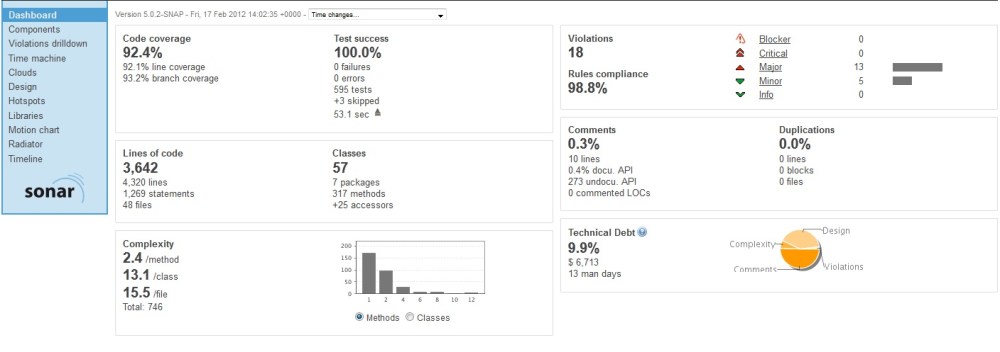
Sonar report

As you can see, Sonar produces a wealth of useful information which we can pour over and discuss in our daily stand-ups. As a rule we try to fix any “critical” rule violations, and keep the unit test coverage percentage up in the 90s (where appropriate). Some people might argue that unit test coverage isn’t a valuable metric, but bear in mind that Sonar allows you to exclude certain files and directories from your analysis, so that you’re only measuring the unit test coverage of the code you want to have covered by unit tests. For me, this makes it a valuable metric.

Moving on from Sonar now, we get to the next stage of my pipeline, and here I’m going to run some Integration Tests (finally!!). The ITs have a much wider scope than the Unit Test, and they also have greater requirements, in that we need an Integration Test Environment to run them in. I’m going to use Ant to control this phase of the pipeline, because it gives me more control than Maven does, and I need to do a couple of funky things, namely:

  • Provision an environment
  • Deploy all the components I need to test with
  • Get my newly built artifact from the ci repository in Artifactory
  • Deploy it to my IT environment
  • Kick of the tests

The Ant script is fairly straightforward, but I’ll just mention that getting our artifact from Artifactory is as simple as using Ant’s own “get” task (you don’t need to use Ivy juts to do this):

<get src=”${artifactory.url}/${repo.name}/${namespace}/${jarname}-${version}” dest=”${temp.dir}/${jarname}-${version}” />

The Integration Test stage takes a little longer than the previous stages, and so to speed things up we can run this stage in parallel with the previous stage. Go allows us to do this by setting up 2 jobs in one pipeline stage. Our Sonar stage now changes to “Reports and ITs”, and includes 2 jobs:

<jobs>
          <job name="sonar">
            <tasks>
              <exec command="mvn" args="sonar:sonar" workingdir="JavaDevelopment" />
            </tasks>
            <resources>
              <resource>windows</resource>
            </resources>
          </job>
 <job name="ITs">
            <tasks>
              <ant buildfile="run_ITs.xml" target="build" workingdir="JavaDevelopment" />
            </tasks>
            <resources>
              <resource>windows</resource>
            </resources>
          </job>
</jobs>

Once this phase completes successfully, we know we’ve got a half decent looking build! At this point I’m going to throw a bit of a spanner into the works. The QA team want to perform some manual exploratory tests on the build. Good idea! But how does that fit in with our Continuous Delivery model? Well, what I did was to create a separate “Release Candidate” (RC) repository, also known as a QA repo. Builds that pass the IT stage get promoted to the RC repo, and from there the QA team can take them and do their exploratory testing.

Does this stop us from practicing “Continuous Delivery”? Well, not really. In my opinion, Continuous Delivery is more about making sure that every build creates a potentially releasable artifact, rather that making every build actually deploy an artifact to production – that’s Continuous Deployment.

Our final stage in the deployment pipeline is to deploy our build to a performance test environment, and execute some load tests. Once this stage completes we deploy our build to the Release Repository, as it’s all signed off and ready to handover to customers. At this point there’s a manual decision gate, which in reality is a button in my CI system. At this point, only the product owner or some such responsible person, can decide whether or not to actually release this build into the wild. They may decide not to, simply because they don’t feel that the changes included in this build are particularly worth deploying. On the other hand, they may decide to release it, and to do this they simply click the button. What does the button do? Well, it simply copies the build to the “downloads” repository, from where a link is served and sent to customers, informing them that a new release is available – that’s just the way things are done here. In a hosted environment (like a web-based company), this button-press could initiate the deploy script to deploy this build to the production environment.

A Word on Version Numbers

This system is actually dependant on each build producing a unique artifact. If a code change is checked in, the resultant build must be uniquely identifiable, so that when we come to release it, we know we’re releasing theexact same build that has gone through the whole pipeline, not some older previous build. To do this, we need to version each build with a unique number. The CI system is very useful for doing this. In Go, as with most other CI systems, you can retrieve a unique “counter” for your build, which is incremented every time there’s a build. No two builds of the same name can have the same counter. So we could add this unique number to our artifact’s version, something like this (let’s say the counter is 33, meaning this is the 33rd build):

myproject.jar-1.0.33

This is good, but it doesn’t tell us much, apart from that this is the 33rd build of “myproject”. A more meaningful version number is the source control revision number, which relates to the code commit which kicked off the build. This is extremely useful. From this we can cross reference every build to the code in our source control system, and this saves us from having to “tag” the source code with every build. I can access the source control revision number via my CI system, because Go sets it as an environment variable at build time, so I simply pass it to my build script in my CI system’s xml, like this:

cobertura:cobertura -Dp4.revision=${env.GO_PIPELINE_LABEL}
-Dbuild.counter=${env.GO_PIPELINE_COUNTER"

p4.revision and build.counter are used in the maven build script, where I set the version number:

    <groupId>com.mycompany</groupId>
<artifactId>myproject</artifactId>
<packaging>jar</packaging>
<version>${main.version}-${build.number}-${build.counter}</version>
<name>myproject</name>

<properties>
<build.number>${p4.revision}</build.number>
<major.version>1</major.version>
<minor.version>0</minor.version>
<patch.version>0</patch.version>
<main.version>${major.version}.${minor.version}.${patch.version}</main.version>
</properties>

If my Perforce check-in number was 1234, then this build, for example, will produce:

myproject.jar-1.0.0-1234-33

And that just about covers it. I hope this is useful to some people, especially those who are using Maven and are struggling with the release plugin!

Being Agile in Release Management

https://jamesbetteley.wordpress.com/2011/11/16/being-agile-in-release-management/

2 great things happened in 2005: Wales won the Grand Slam, and I had my first taste of “agile”. And after having worked on a 3-year-long waterfall project (which still wasn’t finished by the time I left) agile came as a breath of fresh air for me. I was hooked from day 1. I was working as a release manager in a fairly large development team, and since then I’ve worked in a number of different departments, such is the broad spectrum of the work involved in release management. I’ve also worked with teams of all sizes, including offshore teams and partners. Each situation poses its own unique set of challenges and I like to think that working in an agile fashion has equipped me well to overcome these challenges.

You might wonder how a “development methodology” can help a release manager overcome so many different challenges, given that release management doesn’t necessarily lend itself to working like an agile dev team (mainly due to the number of unplanned interruptions) and the answer is simply that agile, for me, goes further than just being a development methodology, it’s a culture.

Change the way you look at things - is the model spinning clockwise or anti-clockwise?

One of the things that I really love about agile is how it teaches you to think differently to how you otherwise might. It teaches you to evaluate things using different criteria – or rather it clarifies  which criteria you should be using to evaluate tasks. For instance, I now look at the tasks that I work on in terms of business value and customer demand, rather than my value and my demand!  In the past I have spent months working on complicated build and release solutions, which may well have been ultimately successful, but weren’t delivered on time and on occasion didn’t do everything that the users wanted.

These days, I certainly wouldn’t approach such a large challenge and try to get it right first time, it simply doesn’t make good business sense – it’s likely to be too costly in terms of time and effort, and by the time it eventually gets to the users it may well not be fit for purpose. Adopting an agile approach certainly helps here. But it’s not quite as simple as this in real life…

Thinking Agile

Thinking in an “agile way” doesn’t necessarily come naturally to release management – the solutions we’re tasked to come up with are often very complicated, need to support a multitude of projects and users, and still need to be simple and robust enough for the next person to be able to pick up. Working out a system like this takes some time. There’s also the added problem that we’re often dealing with live systems, and the risk of “getting it wrong” can be very costly and visible! For that reason, the temptation to do a great deal of up-front planning is HUGE! Another problem is that we try to (or are asked to) produce a one-size-fits-all solution to a very disparate system. I’m talking about things like:

  • We only want one CI system, but there are already 3 being used in the dev team.
  • We only want to use one build tool, but we need to support different programming languages, and the developers have already chosen their favourites.
  • Everyone has their favourite code inspection tools but management want stats that can be compared.
  • QA do things one way, dev do it another. And let’s not even start talking about how NetOps do it!
  • Deployments are done differently depending on which team you’re in, which OS you use, and which colour socks you’re wearing that day.

So as you can see, we’re often faced with competing requirements and numerous different “customers”, each with their own opinions and priorities. The temptation to standardise and make things simpler for everybody leads us down a long and windy road to a solution that invariably ends up being more complex than the problem you tried to solve in the first place. The fact is, there has to be complexity somewhere, and it often ends up in the build & deploy system.

How Do I “Think Agile”?

Well, first of all you have to stop looking at the big picture! I know it sounds crazy, but once you’ve got an idea of the big picture, instead of diving straight in and working on your Sistine Chapel, just write down what your big picture is in terms of a goal or mission statement, and then park it. I like to park it on a piece of A4 and stick it to the wall, but that’s just me! Just write it down somewhere for safe keeping, so that you can refer to it when needs be.

Michelangelo (not the ninja turtle) would have needed a few sprints to finish the Sistine Chapel

I once had a goal to standardise and automate the builds and deployments of every application to every environment, a-la continuous delivery. At the time, that was my Sistine Chapel.

User Stories

The next thing is to start gathering requirements in the form of stories. User stories help you get a real feel for what the users want – they give a sense of perspective and “real-life” which traditional requirements specs just don’t give. I honestly believe you’ve got a much better chance of delivering what people are asking for if you use stories rather than use cases or requirements specs to drive your development. Speak to your customers, the developers, testers, managers and netops engineers, and write down their requirements in the form of stories. I literally go around with a pen and paper and do this. Don’t forget to add your own stories as well – the release engineering team has its own set of requirements too!

User Stories Applied, by Mike Cohn

Next up is to turn these stories into tasks. Some stories can be made up of dozens of tasks, and they may take several sprints to complete, but this is the whole point of this exercise. By breaking the stories down into tasks, you’re creating tangible pieces of work which you can then give relatively accurate estimates on. You’ll often find that some stories contradict one another in the sense that your solution to one story will almost definitely be rendered obsolete when you get around to completing another story later on. Don’t be tempted to put one task off, just because you know you’ll end up changing it later!!

Eventually, when the time comes, you will have to change the work you’ve already done. This is the natural evolution of the process. Obviously it’s better to be future proof  and keeping one eye on the distance is a very useful thing. It would be foolish to write a system that will need to be completely torn down in a matter of a couple of weeks, but there’s a constant balancing act to perform – you need to get tasks completed but you don’t want to be making hard work for yourself in the future. My tactic is to make each solution (be it a deploy script or a new CI system) self-contained, and only later on will I refactor and pull out the common parts – but the point to realise is that this won’t come as a surprise, and you can make sure everyone knows that this work will eventually need doing as a consequence.

Customers and Prioritisation

I’ve learned that all stories must have a sponsor, or “customers”. As I’ve mentioned, these are likely to be developers, testers, management and netops engineers, as well as yourself! Strangely enough the customers are actually a really handy tool in helping you manage your work…

There’s never enough time in the day to get everything done, or at least that’s the way it often seems when you’ve got project managers hassling you to do a release of the latest super-duper project, and management asking you automate the reports, and developers asking you to fix their environments, and then your source control system throws a wobbly. It’s organised chaos sometimes. However, when you’re working on your stories, and your stories have “customers”, you can leave it to your customers to fight it out over which work gets the highest priority! From the list above there are the following high-level tasks:

  • Automate the builds and deployments for the super-duper project
  • Automate the generation of management reports
  • Stabilise the dev environments
  • Implement failover and disaster recovery for your source control system (why has this not been done already???!!!!)

Each of these tasks has a customer, and they all want them doing yesterday. Simply get all the customers in a room and then get the hell out of there work together to sort out the priorities.

How to Deal With Unplanned Work

Probably the single hardest issue to overcome has been how to manage the constant interruptions and unplanned work. A few years back, Rachel Davies came in and gave us some valuable agile coaching, and from those lessons, and my own experiences, I’ve worked out a few ways of dealing with all the unplanned work that comes my way.

First of all, I’ll explain what I mean by unplanned work. I’m essentially talking about anything that crops up which I haven’t included in my sprint plan, which I have to work on at some point during the sprint. Typically these are things like emergency releases, fixing broken environments, sorting out server failures and sometimes emergency secondment into other teams. “Fixing stuff that unexpectedly broke” is probably the most common one!

The way I have come to deal with unplanned work is to start off by pretending it simply doesn’t exist. Plan a sprint as if there will be no unplanned work at all. Then, during the course of the sprint, whenever unplanned work comes your way, take an estimate of how long it took, and more importantly, make an estimate of how much time it has set you back. The two don’t necessarily equate to the same thing, I’ll explain: If I’m working on a particularly complicated scripting task that has taken me a good while to get my head around, and then I’m asked to fix a broken VM or something, the task of fixing the VM may only take an hour or two at most, but getting back to where I was with the script may take me another 2 hours on top of that, especially if someone else has changed it in the meantime! Suddenly I’ve lost half a day’s work due to a one or two hour interruption. The key is to track the time lost, rather than the time taken. I record all of the time lost due to unplanned work in a separate sprint called “Unplanned Work”. I use acunote for this. This allows me to see how much time I lose to unplanned work each sprint. After a while I can see roughly how much time I should expect to “lose” each sprint, and I adjust my sprint planning accordingly.

One way of working, which helps to highlight the amount of unplanned work you’re carrying out, is to plan your sprints as normal, and then say to the customers/sponsors (who should ideally be represented in your planning session) “right, that’s what we could be doing without unplanned work, but now I’m afraid we have to remove x points”. This is a rather crude way of ramming home the reality of working in a department which has a higher than average amount of interruptions and unplanned work (certainly in comparison to dev/qa). It also works as a good way of highlighting the cost of unplanned work to the management team. They hate having work taken out of the sprints and when they realise that unplanned work is costing them in terms of delivery, they are far more likely to act upon it. This could mean investing in better hardware/software, reprioritising that work that you wanted to automate, or hiring more staff.

– If you’re interested to know more about user stories I highly recommend Mike Cohn’s book “User Stories Applied”.

Rachel Davies is an agile consultant who co-authored the “Agile Coaching” book. She also runs agile coaching courses at skillsmatter

Exporting MAVEN_OPTS not working for Freestyle Jenkins Projects

I’m running Jenkins version 1.428 and I have a “Freestyle” project. The aim of this project is to upload a large tar.gz file to an artifactory repository. The team are using Maven so we started out by looking at using Maven to do the deployment. It seems simple enough – you just choose “Invoke top-level maven targets” and add the usual maven deploy details here, like so:


The trouble is, because the tar is so large (126Mb in this instance), it fails with a Java heap space issues (out of memory exception). So, it would be very tempting to try to increase the MAVEN_OPTS by passing it via the JVM Options, as shown below:

Sadly, this doesn’t work. It fails with an ugly error saying MAVEN_OPTS isn’t recognised, or some such thing.

Now, in an attempt to be clever, we thought we could simply execute a shell command first, and get that to set the MAVEN_OPTS, like so:

Good ideah huh? Yeah, well it didn’t work 😦

It looks like there’s a general issue with setting MAVEN_OPTS for freestyle projects in Jenkins version 1.428 – see here for details.

Workarounds:

There’s actually a couple of workarounds. Firstly, you can run maven via the shell execution command, and explicitly pass the MAVEN_OPTS value:

This actually works fine, and is the preferred way of doing it in our case.

The other option is to use Ant to do the deployment – this somehow seems to use a lot less memory and doesn’t fail quite so easily. Also, you don’t have this issue with the MAVEN_OPTS being passed as you can set it directly in the ant file. Here’s the ant file I created (I also created a very basic pom.xml):

<project name=”artifactory_deploy” basedir=”.” default=”deploy_to_repo” xmlns:artifact=”antlib:org.apache.maven.artifact.ant”>
<description>Sample deploy script</description>
<taskdef resource=”net/sf/antcontrib/antcontrib.properties”/>

<property name=”to.name” value=”myrepo” />
<property name=”artifactory.url” value=”http://artifactory.mycompany.com”/&gt;
<property name=”jar.name” value=”massive.tar.gz”/>

<target name=”deploy_to_repo” description=”Deploy build to repo in Artifactory” >
<artifact:pom id=”mypom” file=”pom.xml” />
<artifact:deploy file=”${jar.name}”>
<remoteRepository url=”${artifactory.url}/${to.name}” />
<pom refid=”mypom” />
</artifact:deploy>
</target>

</project>


How Mature Is Your Continuous Integration?

As I’m sure I’ve ranted about mentioned in the past, Continuous Integration is far more than just a collection of tools and scripts. It’s “a practice”, a way of doing something, and it has to be part of our working culture to be truly effective.

I’ve seen instances of CI implemented which are truly magnificent, using great tools, great architecture, very smart scripts and a good process, but I’ve also seen this system fail. Unfortunatley, it’s all too easy to have your wonderful system, and then have it ignored unless there is the right level of buy-in from the people who this system is meant to cater for, nameley development, QA and Management.

The way I currently see it, is that there are a number of levels of CI maturity. I’ll just call these levels “Level 1”, “Level 2” and so on, rather than “Highly Immature”, “Stroppy Teenager” etc:

Level 1

No CI tools to speak of, no CI process. I’ve been there. Builds take about a day to get working. It’s a nightmare. I still shiver just thinking about it.

Level 2

We’ve got some CI tools like cruise control, repeatable builds, but no CI process. We’ve basically got a front-end to a system of chaos. Most of the builds are broken, but you now have a nice way of visualising that, and nobody cares. It’s Level 1 with a pretty wrapper on it.

Level 3

We’ve got a system, but not the right tools. We’ve got a policy of running our tests locally before checking-in, and some poor soul somewhere is left with the task of making the “official” builds for passing to QA. These builds will usually fail and everyone will have to chip in to help sort out the mess until a build can be made. We desperately need a computer to do this build lark for us!

Level 4

We’ve got some rudimentary tools, like Cruise Control or Jenkins, but we’re not using them to their full capacity, but we’ve got a build monkey! The build monkey does his or her best to make sure that people are aware that they’ve broken the build. The build monkey sets up the CI system and makes changes whenever necessary. The build monkey is the first to look into every build failure. The build monkey goes on holiday and the whole place grinds to a halt.

Level 5

We’ve got the tools, we’ve got the process, but nobody’s listening to us!!! All the tools are in place, we’ve got a suitable CI system and maybe we’re even trying to do continuous delivery. The build system is virtualised and we have a release engineering team (the collective noun for a group of build monkeys is a “release engineering”). The only trouble is, the unit test coverage is apalling and people don’t fix their broken builds, despite the fact that we’ve got a nice shiny wiki page saying we should aim to have 95% unit test coverage and broken builds should be fixed within 3o mins.

Level 6

We’ve got the tools, the processes and we’ve got management buy-in! This is looking good, we now have a lovely system, which our team of build engineers looks after, and we have a semi-compliant dev team who get told off if they don’t play ball! We’re all heading in roughly the right direction

Level 7

We’ve got the tools, the process and the right culture! Everyone has buy-in to the build system. Developers and build enginners alike can be trusted to edit build files and even the CI configuration because we all clearly understand what we’re trying to achieve. Best practices are being observed and so our build engineering team don’t need to spend all day chasing people or working on trivial tasks. Our time can be better invested and productivity increased.

Conclusion

Ultimately we’re all responsible for looking after the CI system – it’s for our own benefit afterall. As a developer I want to make sure I have some fast and reliable feedback on the quality of my code changes. If I see my build has failed, I would actually want to find out why, rather than ignore it. As a build engineer I want our CI system to be providing useful feedback to our developers, and useful information to management – if it isn’t, or if this “useful” information isn’t being acted upon, then it’s not really useful at all, and my job is less fulfilling! All of this means that we all have some responsibility to occasionally look under the hood and see what’s going on, and try to figure out why the system is telling me that something isn’t working quite right.

The hardest part to get right, particularly in distributed teams or in companies over a certain size, is the culture. You have to have a team of build engineers and developers who all understand the big picture. Developers need to understand that they are instrumental in making the system work – their input is vital, and they have to understand clearly what benefits they will personally get from this system, otherwise they’ll ignore it. Build engineers in turn need to understand that the more you are able to devolve the ownership of the system, the better it can work, and the more buy-in you will get in return. The build system needs guardians, but it doesn’t need treating like a holy relic.

Coping With Big C.I.

Last night I went along to another C.I. meetup to listen to Tom Duckering, a consultant devops at Thoughtworks, deliver a talk about managing a scaled-up build/release/CI system. In his talk, Tom discussed Continuous Delivery, common mistakes, best practices, monkeys, Jamie Oliver and McDonald’s.

Big CI and Build Monkeys

buildmonkeyFirst of all, Tom started out by defining what he meant by “Big CI”.

Big CI means large-scale build and Continuous Integration systems. We’re talking about maybe 100+ bits of software being built, and doing C.I. properly. In Big CI there’s usually a dedicated build team, which in itself raises a few issues which are covered a bit later. The general formula for getting to Big CI, as far as build engineers (henceforth termed “build monkeys”) are concerned goes as follows:

build monkey + projects = build monkeys

build monkeys + projects + projects = build monkey society

build monkey society + projects = über build monkey

über build monkey + build monkey society + projects = BIG CI


What are the Issues with Big CI?

Big CI isn’t without its problems, and Tom presented a number of Anti-Patterns which he has witnessed in practice. I’ve listed most of them and added my own thoughts where necessary:

Anti-Pattern: Slavish Standardisation

As build monkeys we all strive for a decent degree of standardisation – it makes our working lives so much easier! The fewer systems, technologies and languages we have to support the easier, it’s like macro configuration management in a way – the less variation the better. However, Tom highlighted that mass standardisation is the work of the devil, and by the devil of course, I mean McDonald’s.

McDonald’s vs Jamie Oliver 

ronnysmug git

Jamie Oliver might me a smug mockney git who loves the sound of his own voice BUT he does know how to make tasty food, apparently (I don’t know, he’s never cooked for me before). McDonald’s make incredibly tasty food if you’re a teenager or unemployed, but beyond that, they’re pretty lame. However, they do have consistency on their side. Go into a McDonald’s in London and have a cheeseburger – it’s likeley to taste exactly the same as a cheeseburger from a McDonald’s in Moscow (i.e. bland and rubbery, and nothing like in the pictures either). This is thanks to mass standardisation.

Jamie Oliver, or so Tom Duckering says (I’m staying well out of this) is less consistent. His meals may be of a higher standard, but they’re likely to be slightly different each time. Let’s just say that Jamie Oliver’s dishes are more “unique”.

Anyway, back to the Continuous Integration stuff! In Big CI, you can be tempted by mass standardisation, but all you’ll achieve is mediocrity. With less flexibility you’re preventing project teams from achieving their potential, by stifling their creativity and individuality. So, as Tom says, when we look at our C.I. system we have to ask ourselves “Are we making burgers?”

Are we making burgers?

– T. Duckering, 2011

Anti-Pattern: The Team Who Knew Too Much

There is a phenomenon in the natural world known as “Build Monkey Affinity”, in which build engineers tend to congregate and work together, rather than integrate with the rest of society. Fascinating stuff. The trouble is, this usually leads the build monkeys to assume all the responsibilities of the CI system, because their lack of integration with the rest of the known world makes them isolated, cold and bitter (Ok, I’m going overboard here). Anyway, the point is this, if the build team don’t work with the project team, and every build task has to go through the build team, there will be a disconnect, possibly bottlenecks and a general lack of agility. Responsibility for build related activities should be devolved to the project teams as much as possible, so that bottlenecks and disconnects don’t arise. It also stops all the build knowledge from staying in one place.

Anti-Pattern: Big Ball of CI Mud

This is where you have a load of complexity in your build system, loads of obscure build scripts, multitudes of properties files, and all sorts of nonsense, all just to get a build working. It tends to happen when you over engineer your build solution because you’re compensating for a project that’s not in a fit state. I’ve worked in places where there are projects that have no regard for configuration management, project structures in source control that don’t match what they need to look like to do a build, and projects where the team have no idea what the deployed artifact should look like – so they just check all their individual work into source control and leave it for the build system to sort the whole mess out. Obviously, in these situations, you’re going to end up with some sort of crazy Heath Robinson build system which is bordering on artificial intelligence in its complexity. This is a big ball of CI mud.

Heath Robinson Build System

Heath Robinson Build System a.k.a. "a mess"

Anti-Pattern: “They” Broke MY Build…

This is a situation that often arises when you have upstream and downstream dependencies. Let’s say your build depends on library X. Someone in another team makes a change to library X and now your build fails. This seriously blows. It happens most often when you are forced to accept the latest changes from an upstream build. This is called a “push” method. An alternative is to use the “pull” method, which is where you choose whether or not you want to accept a new release from an upstream build – i.e. you can choose to stick with the existing version that you know works with your project.

The truth is, neither system is perfect, but what would be nice is if the build system had the flexibility to be either push or pull.

The Solutions!

Fear not, for Tom has come up with some thoroughly decent solutions to some of these anti-patterns!

Project Teams Should Own Their Builds

Don’t have a separated build team – devolve the build responsibilities to the project team, share the knowledge and share the problems! Basically just buy into the whole agile idea of getting the expertise within the project team.

Project teams should involve the infrastructure team as early as possible in the project, and again, infrastructure responsibilities should be devolved to the project team as much as possible.

Have CI Experts

Have a small number of CI experts, then use them wisely! Have a program of pairing or secondment. Pair the experts with the developers, or have a rotational system of secondment where a developer or two are seconded into the build team for a couple of months. Meanwhile, the CI experts should be encouraged to go out and get a thoroughly rounded idea of current CI practices by getting involved in the wider CI community and attending meetups… like this one!

Personal Best Metrics

The trouble with targets, metrics and goals is that they can create an environment where it’s hard to take risks, for fear of missing your target. And without risks there’s less reward. Innovations come from taking the odd risk and not being afraid to try something different.

It’s also almost impossible to come up with “proper” metrics for CI. There are no standard rules, builds can’t all be under 10 minutes, projects are simply too diverse and different. So if you need to have metrics and targets, make them pertinent, or personal for each project.

Treat Your Build Environments Like They Are Production

Don’t hand crank your build environments. Sorry, I should have started with “You wouldn’t hand crank your production environments would you??” but of course, I know the answer to that isn’t always “no”. But let’s just take it as read that if you have a large production estate, to do anything other than automate the provision of new infrastructure would be very bad indeed. Tom suggests using the likes of Puppet and Chef, and here at Caplin we’re using VMWare which works pretty well for us. The point is, extend this same degree of infrastructure automation to your build and CI environments as well, make it easy to create new CI servers. And automate the configuration management while you’re at it!

Provide a Toolbox, Not a Rigid Framework

Flexibility is the name of the game here. The project teams have far more flexibility if you, as a build team, are able to offer a selection of technologies, processes and tricks, to help them create their own build system, rather than force a rigid framework on them which may not be ideal for each project. Wouldn’t it be nice, from a build team perspective, if you could allow the project teams to pick and choose whichever build language they wanted, without worrying that it’ll cause a nightmare for you? It would be great if you could support builds written in Maven, Ant, Gradle and MSBuild without any problems. This is where a toolkit comes in. If you can provide a certain level of flexibility and make your system build-language agnostic, and devolve the ownership of the scripts to the project team, then things will get done much quicker.

Consumer-Driven Contracts

It would be nice if we could somehow give upstream builds a “contract”, like a test API layer or something. Something that they must conform to, or make sure they don’t break, before they expose their build to your project. This is a sort of push/pull compromise.

And that pretty much covers it for the content of Tom’s talk. It was really well delivered, with good audience participation and the content was thought-provoking. I may have paraphrased him on the whole Jamie Oliver thing, but never mind that.

It was really interesting to hear someone so experienced in build management actually promote flexibility rather than standardisation. It’s been my experience that until recently the general mantra has been “standardise and conform!”. But the truth is that standardisation can very easily lead to inflexibility, and the cost is that projects take longer to get out of the door because we spend so much time compromising and conforming to a rigid process or framework.

Chatting to Christian Blunden a couple of months back about developer anarchy was about the first time I really thought that such a high degree of flexibility could actually be a good thing. It’s really not easy to get to a place where you can support such flexibility, it requires a LOT of collaboration with the rest of the dev team, and I really believe that secondment and pairing is a great way to achieve that. Fortunately, that’s something we do quite well at Caplin, which is pretty lucky because we’re up to 6 build languages and 4 different C.I. systems already!

8 Principles of Continuous Delivery

continuous deliveryDave Farley co-authored “Continuous Delivery”, an excellent book in the Martin Fowler signature series, which goes into great detail about the evolution of Continuous Integration, and how to achieve continuous delivery (or continuous deployment) using “build pipelines”.

I went along to hear Dave Farley give a talk on Continuous Delivery and how they’re doing it where he works, at LMAX. It was a really great session and he managed to cover, in quite a short session, a great deal of content from in the book. I’ve put together a highlight of what he covered in the talk, mixed with my own take on things

Here’s what I learned…

Continuous delivery is basically the logical extension of Continuous Integration  – it’s a more holistic solution than C.I. though, as it encapsulates a lot more than just the development of software.

For instance, continuous delivery focuses a lot more on requirements than C.I. ever did, and involves a great deal more people on the delivery chain than traditional C.I. as well. It also has a greater customer focus than C.I.

Now, here’s something I didn’t know about continuous delivery…

There are 12 principles behind the agile manifesto. the first of which is:

Our highest priority is to satisfy the customer through early and continuous delivery of valuable software

Well who’d have thought it? Continuous delivery was mentioned waaaaay back in the days of the agile manifesto, some 2500 years BC* and yet for most of us it seems like a pretty new idea.

Continuous delivery is based on the use of smart automation. This is all about creating a repeatable and reliable process for delivering software. You have to automate pretty much everything in order to be able to achieve continuous delivery. manual steps will get in the way or become a bottleneck. This goes for everything from requirements authoring to deploying to production.

The focus is on the finished article – again, this is described as being:

Working software in the hands of the user

software in the hands of the user

software in the hands of the user

Because the focus is on the software in the hands of the user, there’s less tendency from a developers perspective, to simply chuck software over the wall to the QA team, and similarly to the Netops/production team.

Continuous delivery is all about getting that product out there, and getting the feedback from the users. This might mean delivering “unfinished” demo software during your development iterations, and getting your users to give valuable early feedback, or it might mean deploying experimental software to a website cluster and tracking how successful this new site is as compared to the existing system. Either way, it’s all about feedback loops. Essentially you want to have as rapid a feedback loop with your users as possible.

Feedback loops are familiar to everyone who has worked on a Continuous Integration system. In C.I. feedback loops are generally about getting test feedback (unit test, acceptance test, performance test etc) as quickly as possible – “Fail Fast” – as you’ve probably heard.

Continuous Delivery, as described, takes this idea to it’s logical conclusion, and gets the users involved in the feedback loop. This is a good example of how Continuous Delivery is more holistic than its C.I. predecessor. In Continuous Delivery, the feedback loop provides feedback not only on the quality of your code, but on the quality of your requirements, and the quality of your processes for delivering software.

8 Principles of Continuous Delivery

  1. The process for releasing/deploying software MUST be repeatable and reliable. This leads onto the 2nd principle…
  2. Automate everything! A manual deployment can never be described as repeatable and reliable (not if I’m doing it anyway!). You have to invest seriously in automating all the tasks you do repeatedly, and this tends to lead to reliability.
  3. If somethings difficult or painful, do it more often. On the surface this sounds silly, but basically what this means is that doing something painful, more often, will lead you to improve it, probably automate it, and this will eventually make it painless and easy. Take for example doing a deployment of a database schema. If this is tricky, you tend to not do it very often, you put it off, maybe you’ll do 1 a month. Really what you should do is improve the process of doing the schema deployments, get good at it, and do it more often, like 1 a day if needed. If you’re doing something every day, you’re going to be a lot better at it than if you only do it once a month.
  4. Keep everything in source control – this sounds like a bit of a weird one in this day and age, I mean seriously, who doesn’t keep everything in source control? Apparently quite a few people. Who knew?
  5. Done means “released”. This implies ownership of a project right up until it’s in the hands of the user, and working properly. There’s none of this “I’ve checked in my code so it’s done as far as I’m concerned”. I have been fortunate enough to work with some software teams who eagerly made sure their code changes were working right up to the point when their changes were in production, and then monitored the live system to make sure their changes were successful. On the other hand I’ve worked with teams who though their responsibility ended when they checked their code in to the VCS.
  6. Build quality in! Take the time to invest in your quality metrics. A project with good, targeted quality metrics (we could be talking about unit test coverage, code styling, rules violations, complexity measurements – or preferably, all of the above) will invariably be better than one without, and easier to maintain in the long run.
  7. Everybody has responsibility for the release process. A program running on a developers laptop isn’t going to make any money for the company. Similarly, a project with no plan for deployment will never get released, and again make no money. Companies make money by getting their products released to customers, therefore, this process should be in the interest of everybody. Developers should develop projects with a mind for how to deploy them. Project managers should plan projects with attention to deployment. Testers should test for deployment defects with as much care and attention as they do for code defects (and this should be automated and built into the deployment task itself).
  8. Improve continuously. Don’t sit back and wait for your system to become out of date or impossible to maintain. Continuous improvement means your system will always be evolving and therefore easier to change when needs be.

To go with these principles there are also:

4 Practices of Continuous Delivery

  1. Build binaries only once. You’d be staggered by the number of times I’ve seen people recompile code between one environment and the next. Binaries should be compiled once and once only. The binary should then be stored someplace which is accessible only to your deployment mechanism, and your deployment mechanism should deploy this same binary to each successive environment…
  2. Use precisely the same mechanism to deploy to every environment. It sounds obvious, but I’ve genuinely seen cases where deployments to QA were automated, only for the production deployments to be manual. I’ve also seen cases where deployments to QA and production were both automated, but in 2 entirely different languages. This is obviously the work of mad people.
  3. Smoke test your deployment. Don’t leave it to chance that your deployment was a roaring success, write a smoke test and include that in the deployment process. I also like to include a simple diagnostics test, all it does it check that everything is where it’s meant to be – it compares a file list of what you expect to see in your deployment against what actually ends up on the server. I call it a diagnostics test because it’s a good first port of call when there’s a problem.
  4. If anything fails, stop the line! Throw it away and start the process again, don’t patch, don’t hack. If a problem arises, no matter where, discard the deployment (i.e. rollback), fix the issue properly, check it in to source control and repeat the deployment process. A lot of people comment that this is impossible, especially if you’ve got a tiny outage window to deploy things to your live system, or if you do your production changes are done in the middle of the night while nobody else is around to fix the issue properly. I would say that these arguments rather miss the point. Firstly, if you have only a tiny outage window, hacking your live system should be the last thing you want to do, because this will invalidate all your other environments unless you similarly hack all of them as well. Secondly, the next time you do a deployment, you may reintroduce the original issue. Thirdly, if you’re doing your deployments in the middle of the night with nobody around to fix issues, then you’re not paying enough attention to the 7th principle of Continuous Delivery – Everybody has responsibility for the release process. Unless you can’t avoid it, I wouldn’t recommend doing releases when there’s the least amount of support available, it simply goes against common sense.

* Approximate date.

Ten Mistakes That Software Team Leads Make

“Ten Mistakes” (as I shall now call it because I’m too lazy to keep typing the whole title), was a talk by Roy Osherove which I went to at Skills Matter. He basically takes us through ten common mistakes he sees team leaders make, and offers some solutions to them. He also looks like Adam Sandler, I kid you not.

Roy Osherove

Roy Osherove

Adam Sandler

Adam Sandler

Here’s Roy delivering a piece to camera…

And here’s Adam, doing some funny acting, or something.

Adam Roy started us off by talking about a number of questions that team leaders might have. These included such things as:

  • How do I convince my team to do X
  • What do I do with the bad apple in my team?
  • What am I supposed to do as a team lead?
  • Why can’t we get away from fighting fires?
  • Will I lose friends?

He said that these were all questions that haunted him for years, and in the rest of the talk he goes on to explain how to answer them. He is also in the process of writing a book called “Notes to a Software Team Leader” which also covers these points.

So, we then moved on to the first of the Ten Mistakes…

#1 Not Recognising Team Maturity

This was a good place to start because much of the talk referred back to the “maturity level” of the team. Roy says that there are 3 levels of maturity when it comes to describing agile teams. These are:

  1. Chaos
  2. Learning
  3. Self-Leading

Chaos

A chaos team is one where people are always too busy. Maybe they’re always firefighting or they’re just being asked to too much in too little time, eithesinking shipr way, the result is the same – chaos. Nobody has any time to get organised and nobody has any time to learn anything new because they’re just too busy for that. This is obviously not a great maturity level to be at if you ask me, because eventually people will suffer burn out or get frustrated at the lack of opportunities to learn, and eventually the good guys will leave. However, Roy says that the chaos level is actually exceedingly common, and I can easily believe him. The trick is to act in an appropriate way if you’re the leader of a chaos team. A chaos team leader needs to be assertive and strong in their actions.

When the ship is sinking, you need a leader to give orders, not call a meeting

A chaos team leader will often need to take a stand and maybe tell management that the team cannot do everything that they’re being asked to do. It’s a tough role, it requires you to make tough decisions with conviction.

Management done right is a really tough job

So why, as a team leader, do you have to make all of these tough decisions yourself, instead of discussing them with your team? Well the simple answer is that there just isn’t enough time for meetings. by making these executive decisions yourself, you’re giving your team some breathing space, or simply just the space they need to get their work done. Sure, you might make a few wrong decisions, life’s tough, but it’s for the greater good because you’re giving your team the space they need to grow into the next level, a Learning Team.

Learning

This level of maturity is one in which the team has a greater degree of self organisation, but the team members still need to be coached. A team leader will need to grow his/her team by constantly challenging and questioning them, maybe even setting them homework! The goal with these teams is to improve week-on-week, and to get the team members to start solving their own problems.

So what are you going to do about it?

As a team leader of a Learning team you need to start to get your team members to solve their own problems in order to grow into a self-leading team. So if someone comes to you with a problem, encourage them to think of ways to fix their issue, and empower them to do so by responding with “so what are you going to do about it?”.

Self Leading

The third level of maturity is the self-leading team. This is where we all want to be! In this team, the leader is more like a mentor – he doesn’t tell people what to do or make executive decisions on behalf of the team as he/she would in a chaos team. Even in a self leading team, the team leader should still spend in excess of 50% of his time with his team.

So, the first mistake in our list is to not recognise what maturity level your team is at, and therefore not know how to lead your team in the right way. If you run your team as if they were self-leading, but in reality they’re chaos, then before long you’ll be heading up a certain creek without a paddle.

#2 Fear of Delegation

If you’re used to taking things on and doing them yourself, then it can be quite hard to feel comfortable delegating work to people, especially if you have trouble relying on others to get the work done.

If everyone feels comfortable in what they’re doing, then you’re doing something wrong

When you delegate work, you’ll need to get used to asking other people to take responsibility for something you’d otherwise do yourself. This responsibility can take some people out of their comfort zone, and this is a good thing. It’s important to challenge your team and get them out of their comfort zone as it’ll help them grow.

#3 Fear of Engagement

This generally means not communicating effectively, but Roy breaks this down even further:

#4 Placating

“The Bus Factor” – what’s that? Well, the bus factor is the number of people needed to get hit by a bus for the project to grind to a standstill. It’s all about individuals holding lots of information. I’ve seen this in a number of places, on good projects as well as bad, so I think it’s fairly natural, but the point that Roy makes is that you mustn’t placate these individuals just because they hold a lot of crucial knowledge. A person with a bus factor of 1 (meaning they could bring the project to a halt if they got hit by a bus) should be treated just the same as anyone else. I love the idea of people having a bus factor, just because it reminds me of the Kevin Bacon number.

#5 Being Irrelevant

I think this is about being in too many meetings and dealing with too many emails etc and so on – basically not being there for the team, losing contact with the real work, and generally being irrelevant. Nothing to do with Kevin Bacon.

#6 Being Super-reasonable

Not sure I really agree with the terminology here but Roy says that it’s super-reasonable to assume that everyone understands what your talking about when in reality you might not be getting your point across. I think the point to make here is that when you’re dealing with groups of people, as in an agile team, it’s wrong to assume they all have the same level of knowledge and understanding as yourself, and that you should communicate with them in the best way suitable, which tends to be by not making too many assumptions.

#7 Blaming

If you make your mind up that someone’s rubbish, then you will consciously and subconsciously use this as an excuse to not engage that individual. There will always be some people who are rubbish, but what you need to do is work on their weaknesses and bring them up to the level of the team, rather than to avoid engaging them, as this just means you’ll constantly be carrying a dead weight.

#8 Ignoring Behaviour Forces

You must understand the forces that act on a person in order to understand how they behave. There are 3 main types of forces that act on a person:

  • Personal
  • Social
  • Environmental

All of these can affect a teams ability to be successful, and you need to work out exactly what these forces are, and determine whether they are affecting your teams ability. An example of an environmental force is not having enough hardware to do what you need to do – for instance, if you don’t have budget for a continuous integration server then it’s going to be almost impossible to be agile.

#9 Fear of Assertiveness

Apparently this is common in the UK and in Norway, but not in Denmark. Bet you didn’t know that. Well it’s true, allegedly. Anyway, assertiveness is all about standing your ground and not living with things that you feel aren’t acceptable. If your team is in chaos mode, then you need to be especially assertive. A fear of being assertive can be disastrous in a chaos team.

#10 Spreading Non-Commitment

This is about using vague language. Roy says that you should always commit to deadlines, and when speaking to your team, make sure they tell you when they will do something by. Apparently, just by making the commitment in the words they use, they will be more motivated to deliver on that commitment. Roy suggests that when you have a meeting, end it by asking people what they’re actions are, and make sure they answer in the form “I will do X by Y”. However, people should only commit to doing things that are under their control, there’s no point committing to doing something that you have to get someone else to do. Also, as soon as you know that you’re unable to deliver on time, let the team know and they might be able to help you out and maybe then you will be able to deliver on time.

Questions and Answers

The Q&A went on for an age. I’ll summarise in bullet form, because bullet points are great!

  • You need to recognise when to change your leadership style – you need to stop being a chaos team leader if the team moves on the being a learning team
  • There’s no such thing as a chaotic learning team. The 2 cannot co-exist, however, teams can switch from one form to another.
  • Overseas teams don’t work as well as having everyone in-house. If you’re in this situation, you need to “change your reality”.
  • Agile teams should be 2 pizza teams – i.e. only as large as can be fed by 2 pizzas.
  • Good teams are grown, not hired
  • Scrum sometimes doesn’t fit teams in chaos mode
  • There’s no difference between a team leader and a manager if they’re the same person, which they can be.
  • Protect your team from project managers if your in the chaos mode

Books

A number of books were mentioned. Here they are!

Managing Teams Congruently – Gerald M Weinberg

Managing Teams Congruently

Behind Closed Doors – Johanna Rothman

Behind Closed Doors

Influencer (The Power To Change Anything) – Patterson et al

Influencer - The Power To Change Anything

Succeeding With Agile – Mike Cohn

Succeeding With Agile

Changing File Permissions On Files in Perforce

I had a script file which I had written on my Windows machine, which I wanted to execute on the build server. However, the build server couldn’t execute it because it didn’t have execute permissions by default, and I couldn’t change this on my windows machine.

So, what I had to do was check out the file on my linux box, using a clientspec I’d created, and edit the permissions like this:

p4 -c my_clientspec_test edit -t text+x jamestest.sh

my_clientspec_test is the name of the clientspec I used

jamestest.sh is my script file, obviously.

-t  tells the system to open the file as a particular type – in this case we pass text+x, which means text, with the “executable” modifier.

Of course, if your file isn’t text type you need to change the command to suit, i.e. -t binary+x if it’s a binary.

Continuous Delivery in Practice

A couple of months ago I was fortunate enough to be invited to the Thoughtworks live 2011 event in London. The main topics of this event were agile (as you’d expect from Thoughtworks) and Continuous Delivery. The event was run over 2 days, the first day included talks from Jez Humble and Martin Fowler, as well as a number of other speakers (Dave West did a session on agile vs the rest, Beyond BudgetingBjarte Bogsnes presented a very interesting session called “Beyond Budgeting”, and Scott Durchslag was guest speaking about how agile has worked at Expedia, and his interest in Continuous Delivery). My colleague Steve Morgan was also in attendance on the first day and has produced this excellent post on the contents of day 1. I won’t say much more about the first day because Steve’s post covers it better than I ever could (he cheated by taking notes/paying attention). However, I will just add that it was great to see so many people who genuinely seemed passionate about the evolution of agile, and the coffee breaks were a great opportunity to pick the brains of Messrs Fowler and Humble. I particularly enjoyed the “Beyond Budgeting” talk from Bjarte, and am happy to say he’s written a book about it, which you can buy on the internets!

The only other thing I would say about day 1 was that there was a reasonably good choice of biscuits. Biscuit variety is important and mustn’t be underestimated.

Day 2

Day 2 was somewhat more hands on than the first day, and also more tools-oriented. It started off with another session from Jez Humble and Martin Fowler, where they discussed continuous delivery, covering some of the contents of Jez’s book, and also going into detail about branching (feature branching vs Continuous Integration).Continuous delivery book The sessions then moved on to cover some of the products being produced at Thoughtworks Studios. There were talks from Andy Kemp and Suzie Prince about their products Mingle and Twist. Mingle is marketed as an agile project management tool. I’ve not used it myself but it seems to be based around shared workspaces and good requirements tracking. As you’d expect, it seems to integrate well with the other Thoughtworks products, which is probably one of its main advantages. Twist is a functional testing platform, which is very agile-centric in that it allows you to run requirements specs as tests in the “As a user, I want to…” style. Again it’s the integration with the other tools and products that made it look good to me. I’ve used a lot of agile tools recently, which all seem to be great on their own, but putting them all together so that I can track a requirement through to a test and a change through to a build can be a lot of hard work. The final product that they presented was Go, which is their Continuous Integration system, and they even showed us how they used Go to deliver builds of Mingle, Twist and even Go itself (talk about eating your own dogfood).

The centrepiece of day 2 though was of course my very own talk on how we at Caplin Systems are using Go in our Continuous Delivery system 🙂 I was invited to present a session on how Go is helping us achieve our Continuous Integration goals, and how we are using it to implement our own brand of Continuous Delivery. I’ve embedded my presentation above – sorry it’s not a video. I won’t go into too much detail (I’ll save you the lecture), but basically we’re using build pipelines along with a high degree of automated tests to deliver builds which are suitable for deployment. The other feature I have to mention is how Go manages multiple agents. We have about 60 active agents which Go manages. A build can be farmed out to any of these 60 agents, and if a particular resource is needed (let’s say I need to run a test on a particular OS, like Centos) then Go can be configured to send the builds to the right agents. Particular builds can be configured to be excluded from certain agents, meaning the system is highly configurable.

In the afternoon we had an open-space session, during which I spent most of my time with a group discussing database deployments and how to bring db changes under Continuous Integration. It seems there are still a lot of people around who feel that this aspect is largely overlooked with respect to Continuous Integration, and this was reflected in the way people were talking about using manual db compare tools as a way of deploying db changes to production. My own feelings on this are that database changes should be treated more like code changes, with each change scripted and deployed as a code change would be. There needn’t be destructive changes, and a good set of test data should help catch the issues that are often only found in production.