Agile ITOps: Day 1

Today we started day 1 of our first ever ITOps sprint. This all came about because we needed a way of working out our productivity on “project tasks”, as well as learning how to triage our interruptions a bit better. None of the IT Ops team had tried any form of agile before, so there’s a mix of excitement and apprehension at the moment! I’ve opted for the old skool cards and sprint board (we’re using scrum by the way – more on this in a bit) rather than using an IT based system like Jira. This is mainly because everyone’s co-located, but also because I think it’s a good way to advertise what we’re doing within the office, and it’s an easy way to introduce a team to scrum.

The team already had a backlog of projects, so it was quite an easy job to break these down into cards. First of all we prioritised the projects and then sized up a bunch of tasks. We’re guessing, for this first sprint, that we’ll probably be around 40% to 50% productive on these project tasks, while the rest of our time will be taken up by interruptions (IT requests, responding to inquiries, dealing with unexpected issues etc).
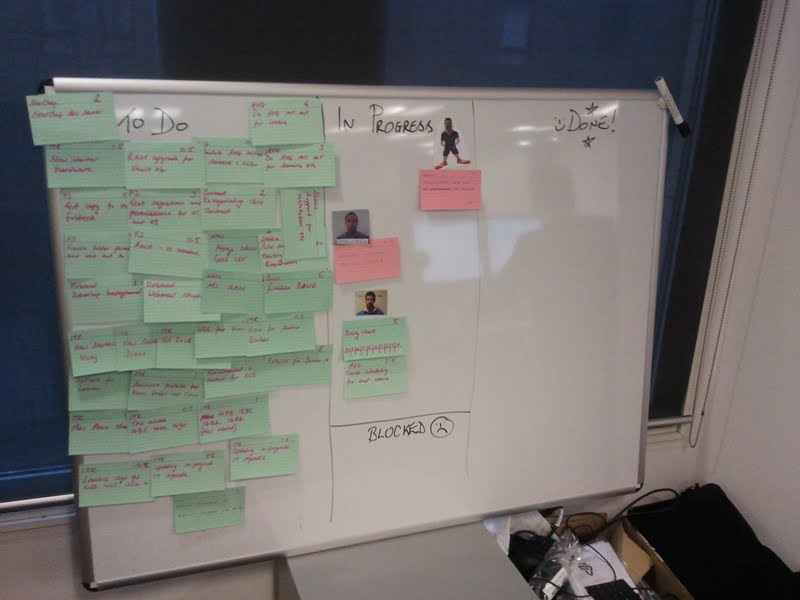
Sprint 1 – planned, or “committed” tasks are on green cards, while interruptions go on those lovely pinky-reddish ones.

I’m using a points system which is roughly equivalent to 1 point = 1 hour’s effort. This is a bit more granular than you might expect in a dev sprint, but since we’re dealing with a very high number of smaller tasks, I’ve opted for this slightly more granular scale.

As well as project work, there was also an existing list of IT requests which were in the queue waiting to be done. I wanted to “commit” to getting some of these done, so we planned them in to the sprint. I had originally thought of setting a goal of reducing the IT request queue by 30 tickets, and having that as a card, but I decided against this because I don’t feel it really represents a single task in it’s own right. I might change my mind about this at a later date though! So instead of doing that, we just chose the highest priority IT requests, and then arranged them by logical groupings (for instance, 3 IT requests to rebuild laptops would be grouped together). At the end of our planning session we had committed to achieving approximately 40% productivity.

Managing Interruptions

We expect at least 50% of our time to be taken up by interruptions – this is based on a best-guess estimate, and will be refined from one sprint to the next as we progress on our agile journey. Whenever we get an interruption, let’s say someone comes over and says his laptop is broken, or we get an email saying a printer has mysteriously stopped working, then we scribble down a very brief summary of this issue on a red/pink card and make a quick call on whether it’s a higher priority that our current “in progress” tasks. If it is, then it goes straight into “in progress”, and we might have to move something out of “in progress” if the interruption means we need to park it for a while. Otherwise, the interruption will go in the backlog or in the “to do” list, depending on urgency.

At the end of the sprint we’re expecting to see a whole lot more red cards than green ones in the “Done” column. Indeed, we’re only a couple of hours into the first sprint an already the interruption cards contribute more than a 4:1 ratio in terms of hours actually worked today!
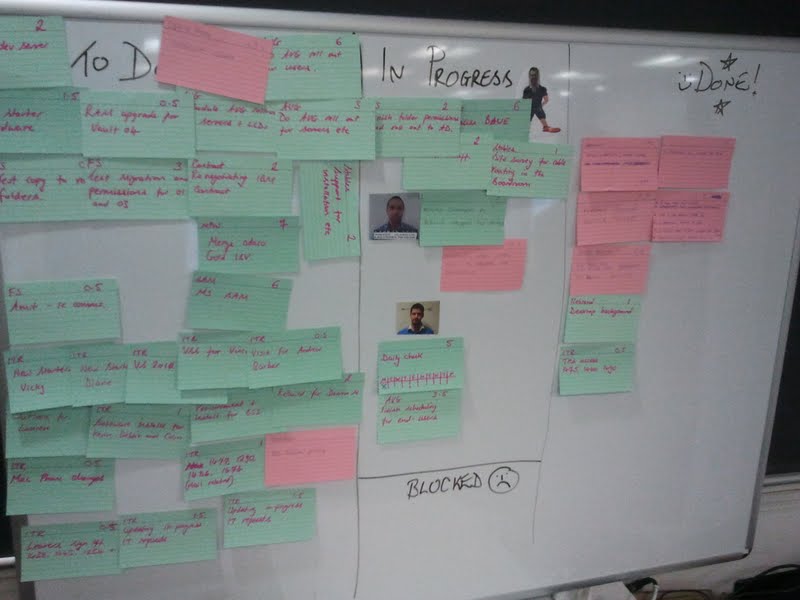
Interruptions already outweigh “committed” tasks by 4:1 in terms of hours worked – looks like my 40% guess was a bit optimistic!

Triage and Priorities

One of the goals of this agile style of working is to get us to think a bit smarter when it comes to prioritising interruptions. It’s been felt in the past that interruptions always get given higher priority over our project work, when perhaps they shouldn’t have been. I suspect that in reality there’s a combination of reasons why the interruptions got done over project work: they’re usually smaller tasks, someone is usually telling you it’s urgent, it’s nice to help people out, and sometimes it’s not very easy to tell someone that you aren’t going to do their request because it’s not high enough priority. By writing the interruptions down on a card, and being able to look at the board and see a list of tasks we have committed to deliver, I’m hoping that we will be able to make better judgement calls on the priority, and also make it easier to show people that their requests are competing with a large number of other tasks which we’ve promised to get done.

Why Scrum?

I don’t actually see this as the perfect solution by any means, and as you might be able to tell already, there’s a slight leaning towards Kanban. I eventually want to go full-kanban, so to speak, but I feel that our scrum based approach provides a much easier introduction to agile concepts. Kanban seems to be much more geared towards an Ops style environment, with it’s continuous additions of tasks to the backlog and its rolling process. I think the pull based system and the focus on “Work In Progress” will provide some good tools for the ITOps team to manage their work flow. For now though, they’re getting down with a bit of scrum to get used to the terms and the ideas, and to understand what the hell the devs are talking about!

Retrospectives, burn-downs and Continuous Improvement

We’ll stick with scrum for a while and at the end of our sprint we’ll demo what project work we actually got through, as well as advertise the amount of IT requests we did, and the number of “interruptions” we successfully handled (although I don’t think I’ll keep calling them “interruptions” :-)). I’m also looking forward to our first retrospective, which we’ll be doing at the end of each sprint as a learning task – we want to see what we did well and what we did badly, as well as take a good look at our original estimations!

I’ll keep track of our burndown, and as the weeks go by I’ll try to give the team as much supporting metrics/information as I can, such as the number of hours since an interruption, the number of project tasks that are stuck in “In Progress” etc. But most important of all, we’re looking at this as a learning experience, an opportunity for us to improve the way we manage projects and a chance for everyone to get better at prioritising and estimating.

I’ll keep the posts coming whenever I get the chance!

Continuous Delivery with a Difference: They’re Using Windows!


Last night I was taken to the London premier of Warren Miller’s latest film called “Flow State”. Free beers, a free goodie bag and an hour and a half of the best snowboarders and skiers in the world doing tricks which in my head I can also do, but in reality are about 10000000% better than anything I can manage. Good times. Anyway, on my way home I was thinking about “flow” and how it applies to DevOps. It’s a tricky thing to maintain in an Ops capacity. It reminded me of a talk I went to last week where the speakers talked of the importance of “Flow” in their project, and it’s inspired me to write it up:

Thoughtworkers Pat and Aleksander have been working at a top secret location* for a top secret company** on a top secret mission to implement continuous delivery in a corporate Windows world***
* Ok, I actually forgot to ask where it was located

** It’s probably not a secret, but they weren’t telling me

*** It’s obviously not a secret mission seeing as how: a) it was the title of their talk and b) I just said what it was

Pat and Aleksander put their collective Powerpoint skills to good use and made a presentation on the stuff they’d done and learned during their time working on this top secret project, but rather than call their presentation “Stuff We Learned Doing a Project” (that’s what I would have named it) they decided to call it “Experience Report: Continuous Delivery in a Corporate Windows World”, which is probably why nobody ever asks me to come up with names for their presentations.

This talk was at Skills Matter in London, and on my way over there I compiled a list of questions which I was keen to hear their answers to. The questions were as follows:

  1. What tools did they use for infrastructure deployments? What VM technology did they use?
  2. How did they do db deployments?
  3. What development tools did they use? TFS?? And what were their good/bad points?
  4. Did they use a front-end tool to manage deployments (i.e. did they manage them via a C.I. system)?
  5. Was the company already bought-in to Continuous Delivery before they started?
  6. What breed of agile did they follow? Scrum, Kanban, TDD etc.
  7. What format were the built artifacts? Did they produce .msi installers?
  8. What C.I. system did they use (and why did they decide on that one)?
  9. Did they use a repository tool like Nexus/Artifactory?
  10. If they could do it all again, what would they do differently?

During the evening (mainly in the pub afterwards) Pat and Aleksander answered almost all of the questions above, but before I list them, I’ll give a brief summary of their talk. Disclaimer: I’m probably paraphrasing where I’m quoting them, and most of the content is actually my opinion, sorry about that. And apologies also for the completely unrelated snowboarding pictures.

Cultural Aspects of Continuous Delivery

Although CD is commonly associated with tools and processes, Pat and Aleksander were very keen to push the cultural aspects as well. I couldn’t agree more with this – for me, Continuous Delivery is more than just a development practice, it’s something which fundamentally changes the way we deliver software. We need to have an extremely efficient and reliable automated deployment system, a very high degree of automated testing, small consumable sized stories to work from, very reliable environment management, and a simplified release management process which doesn’t create problems than it solves. Getting these things right is essential to doing Continuous Delivery successfully. As you can imagine, implementing these things can be a significant departure from the traditional software delivery systems (which tend to rely heavily on manual deployments and testing, as well as having quite restrictive project and release management processes). This is where the cultural change comes into effect. Developers, testers, release managers, BAs, PMs and Ops engineers all need to embrace Continuous Delivery and significantly change the traditional software delivery model.

FACT BOMB: Some snowboarders are called Pat. Some are called Aleksander.

Tools

When Aleksander and Pat started out on this project, the dev teams were already using TFS as a build system and for source control. They eventually moved to using TeamCity as a Continuous Integration system, and  Git-TFS as the devs primary interface to the source control system.

The most important tool for a snowboarder is a snowboard. Here’s the one I’ve got!

  • Builds were done using msbuild
  • They used TeamCity to store the build artifacts
  • They opted for Nunit for unit testing
  • Their build created zip files rather than .msi installers
  • They chose Specflow for stories/spec/acceptance criteria etc
  • Used Powershell to do deployments
  • Sites were hosted on IIS


Practices

“Work in Progress” and “Flow” were the important metrics in this project by the sounds of things (suffice to say they used Kanban). I neglected to ask them if they actually measured their flow against quality. If I find out I’ll make a note here. Anyway, back to the project… because of the importance of Work in Progress and Flow they chose to use Kanban (as mentioned earlier) – but they still used iterations and weekly showcases. These were more for show than anything else: they continued to work off a backlog and any tasks that were unfinished at the end of one “iteration” just rolled over to the next.

Another point that Pat and Aleksander stressed was the importance of having good Business Analysts. They were essential in carving up stories into manageable chunks, avoiding “analysis paralysis”, shielding the devs from “fluctuating functionality” and ensuring stories never got stuck for too long. Some other random notes on their processes/practices:

  • Used TDD with pairing
  • Testers were embedded in the team
  • Maintained a single branch of code
  • Regression testing was automated
  • They still had to raise a release request with Ops to get stuff deployed!
  • The same artifact was deployed to every environment*
  • The same deploy script was used on every environment*

* I mention these two points because they’re oh-so important principles of Continuous Delivery.

Obviously I approve of the whole TDD thing, testers embedded in the team, automated regression testing and so on, but not so impressed with the idea of having to raise a release request (manually) with Ops whenever they want to get stuff deployed, it’s not very “devops” 🙂 I’d seek to automate that request/approval process. As for the “single branch of code”, well, it’s nice work if you can get it. I’m sure we’d all like to have a single branch to work from but in my experience it’s rarely possible. And please don’t say “feature toggling” at me.

One area the guys struggled with was performance testing. Firstly, it kept getting de-prioritised, so by the time they got round to doing it, it was a little late in the day, and I assume this meant that any design re-considerations they might have hoped to make could have been ruled out. Secondly, they had trouble actually setting up the load testing in Visual Studio – settings hidden all over the place etc.

Infrastructure

Speaking with Pat, he was clearly very impressed with the wonders of Powershell scripting! He said they used it very extensively for installing components on top of the OS. I’ve just started using it myself (I’m working with Windows servers again) and I’m very glad it exists! However, Aleksander and Pat did reveal that the procedure for deploying a new test environment wasn’t fully automated, and they had to actually work off a checklist of things to do. Unfortunately, the reality was that every machine in every environment required some degree of manual intervention. I wish I had a bit more detail about this, I’d like to understand what the actual blockers were (before I run into them myself), and I hate to think that Windows can be a real blocker for environment automation.

Anyway, that’s enough of the detail, let’s get to the answers to the questions (I’ve added scores to the answers because I’m silly like that):

  1. What tools did they use for infrastructure deployments? What VM technology did they use? – Powershell! They didn’t provision the actual VMs themselves, the Ops team did that. They weren’t sure what tools they used.  1
  2. How did they do db deployments? – Pass 0
  3. What development tools did they use? TFS?? And what were their good/bad points? – TFS. Source Control and C.I. were bad so they moved to TeamCity and Git-TFS 2
  4. Did they use a C.I. tool to manage deployments? – Nope 0
  5. Was the company already bought-in to Continuous Delivery before they started? – They hired ThoughtWorks so I guess they must have been at least partly sold on the idea! Agile adoption was on their roadmap 1
  6. What breed of agile did they follow? Scrum, Kanban, TDD etc. – TDD with Kanban 2
  7. What format were the built artifacts? Did they produce .msi installers? – Negatory, they used zip files like any normal person would. 2
  8. What C.I. system did they use (and why did they decide on that one)? – TeamCity, which is interesting seeing as how ThoughtWorks Studios produce their own C.I. system called “Go”. I’ve used Go before and it’s pretty good conceptually, but it’s also expensive and hard to manage once you’re running over 50 builds and 100 test agents. The UI is buggy too. However, it has great features, but the Open Source competitors are catching up fast. 2
  9. Did they use a repository tool like Nexus/Artifactory? – They used TeamCity’s own internal repo, a bit like with Jenkins where you can store a build artifact. 1
  10. If they could do it all again, what would they do differently? – They wouldn’t push so hard for the Git TFS integration, it was probably not worth the considerable effort at the end of the day. 1

TOTAL: 12

What does this total mean? Absolutely nothing at all.

What significance do all the snowboard pictures have in this article? None. Absolutely none whatsoever.

Installing Artifactory on Ubuntu

I was messing around with some permissions settings on our “Live” verison of Artifactory, as you do, and then suddenly I thought “No! This feels wrong… I’m sure there’s someone who would be having a fit right now if he knew I was guffing around with the permissions on the live version of Artifactory…”. That someone is of course me. So I duly pressed cancel, and decided to do things “properly”, i.e. install a local version of Artifactory and mess around with that one instead.

Easier said than done.

How NOT to Install Artifactory on Ubuntu

If you want to know how to install Artifactory on Ubuntu, I’d suggest skipping to the “How to Install Artifactory on Ubuntu” section, below. However, if you’d love to know exactly how to NOT install Artifactory on Ubuntu while following the Artifactory installation instructions and getting really annoyed, then read on!

I decided to install it on my Ubuntu VirtualBox VM, because surely that would be easier than installing it on my Windows box, right? My Ubuntu VM is running java 1.7. So I downloaded the artifactory zip and extracted it. Dead easy! Then I followed this particular instruction on the artifactory installation webpage:

Before you install is recommended you first verify your current environment by running artifactoryctl check under the $ARTIFACTORY_HOME/bin folder

But by default it wasn’t executable, so I had to chmod it, duuuuh! So I did that, ran it, and I got the following error:

ARTIFACTORY_HOME not set

Er, well, no, I haven’t set ARTIFACTORY_HOME, that’s true. I had no idea I had to set it anywhere. So I set it in my profile, sourced it, and all that stuff.

I ran the artifactoryctl check command again and got another message saying:

Cannot find a JRE or JDK. Please set JAVA_HOME to a >=1.5

But that’s rubbish! I totally have 1.7 installed!! I checked my paths and all the rest. All looked fine to me. After a little while I got bored of seeing that exact same message, so I decided to just stop bothering with this stupid “artifactoryctl check” thing, and just moved on with the installation by running the $ARTIFACTORY_HOME/bin/install.sh script

ffs!

Gah! Not logged in as root. Sudo sudo sudo.

That’s better. I got a little message saying “SUCCESS” which was nice, followed by:

Installation of Artifactory completed. You can now check installation by running:

> service artifactory check

Okey dokey then, I’ll go do that!

Gahh!!! SUDO MAKE ME A SANDWICH!!!

Sudo !! is probably my most frequently typed command, along with “ll” (swiftly followed by “ls -a” when I realsie the ll alias hasn’t been setup. I’m an idiot, ya’see).

Anyway, following a swift sudo !! I got the following message:

Found JAVA= in JAVA_HOME=

Cannot find a JRE or JDK. Please set JAVA_HOME to a >=1.5 JRE

Erm, I’m pretty sure that’s not right. I definitely remember installing Java 1.7 and setting JAVA_HOME. So I echoed JAVA_HOME. Sure enough, it’s pointing to my 1.7 installation path.

Turns out that setting it in my bash profile wasn’t good enough, and I had to also put it in the following file:

/etc/artifactory/default

Oh, and don’t put the symlink path in for JAVA_HOME, that didn’t work. I had to put the full path in (/usr/bin/java got me nowhere). I literally had to put the full location in (mine was /usr/lib/jvm/java-7-openjdk-amd64/jre/). Anyway, that just about did it. Piss easy!

How to Install Artifactory on Ubuntu

  • Make sure you’ve got Java 1.5 or above installed, and make a note of the full path, as you’re going to need this later (mine was /usr/lib/jvm/java-7-openjdk-amd64/jre/).
  • Download the artifactory zip and extract it somewhere.
  • Go to your artifactory bin dir and make the install.sh file executable
  • Now run sudo ./install.sh – this will copy some files around the place and setup some paths.
  • Edit the file /etc/artifactory/default and put the FULL Java path in there as JAVA_HOME
  • Make sure JAVA_HOME is also set in /etc/environment
  • run “sudo service artifactory check”
  • If it all looks good run “sudo service artifactory start”
  • Go to http://localhost:8081/artifactory/
  • You’re done!

Read-only Gradle Wrapper Files Are Bad, mmkaay

I’ve just been messing around with a Gradle build using Gradle Wrapper, trying to import an ant build which does some clever stuff. I couldn’t get it to work, so I eventually changed the Ant script to just echo a variable, and then just tried importing the ant file into gradle and calling the echo task, like this:

ant file (test.xml):

    <target name=”test” >
<echo>the value of main.version is ${main.version}</echo>
</target>

Gradle file:

ant.importBuild ‘test.xml’

And I was just running this:

gradlew test

Simples, right? Well, as it happens, no. I’m running the 1.0 “release” of gradle wrapper (which is actually versioned as 1.0-rc-3, strangely enough). Whenever I tried to run my highly complicated build (ahem), I got this lovely error:

Could not open task artifact state cache (D:\development\ReleaseEngineering\main\commonBuildStuff\.gradle\1.0-rc-3\taskArtifacts).
> java.io.FileNotFoundException: D:\development\ReleaseEngineering\main\commonBuildStuff\.gradle\1.0-rc-3\taskArtifacts\cache.properties.lock (Access is denied)

Access is denied! Gah! Of course it is! Wait, why is access denied? Well, basically that file is read-only because it’s in source control and I’m using Perforce. I removed the read-only flag and the build worked. Problem temporarily solved. It’s going to be interesting to see how this is going to work in the C.I. system…


PowerCLI: Reverting CI Agents to Snapshot

My friend Ed’s capacity to automate stuff is quite awesome. Yesterday he automated a way of making our Continuous Integration system alert us when one of the agents went offline. This is already automated in our CI system, but it just wasn’t automated enough for Ed’s liking, so he wrote a script. His script will send us an email whenever an agent goes offline. I haven’t recieved any emails so far, so either the agents are all fine, or the script isn’t working – there’s no way to tell, so I expect Ed will automate a way of telling us whether the automated script has run successfully.

Then today, in the true spirit of “DevOps”, he tells me he has automated a way of reverting our CI agents to a snapshot and plugged it in to the CI system, for good measure. The CI agents are all VMs deployed by VMware, so Ed has used the PowerCLI plugin to do the automation.

Basically the script just iterates over a list of VMs which are in a particular resource pool, and reverts them all to a snaphot. Here’s the script itself:

connect-viserver myserver.mycompany.com -User username -Password secret

$vmcsv = import-csv $args[0]

ForEach($line in $vmcsv){
Get-VM $line.name | Get-Snapshot -Name $line.snap | Set-VM -VM $line.name -confirm:$false
Get-VM $line.name | Start-VM
}

disconnect-viserver -confirm:$false

import-csv looks something like this:

name, snap
linuxSvr1, snap1
xpSvr1, snap1
xpSvrIE7, snap1
w7SvrIE8, snap1
w7SvrIE9, snap1

Ed has added the execution of this script to our CI system, so any of the devs can revert their CI servers to a snapshot by simply pressing a button. They key thing here is to organise VMs into resource pools. We’ve got dedicated resource pools per dev team/project, so it’s safe enough to allow the devs to do this without running the risk of affecting anyone elses CI builds.

You can follow Ed on twitter (@ElMundio87) and check out his blog here: http://www.elmundio.net/blog/

Continuous Delivery Warts and All

Tom Duckering was back at Skills Matter this week, and this time he bought a friend (and fellow thoughtworker), Marc Hofer. They were there to talk to us about a “real life” continuous delivery project they’ve recently been working on. I sat, listened, took notes, and then I had to leave because I was meeting my girlfriend at the cinema to watch “Snow White and the Huntsman”, which was absolutely AWFUL by the way. Do not waste your time on this movie, it seriously drags on forever and I actually fell asleep before the end. It has Charlize Theron in it (is it me or is she in everything right now?), but don’t let that fool you, it’s still rubbish. Anyway, as I was saying, I took notes, and this is what I learned…

Warts?

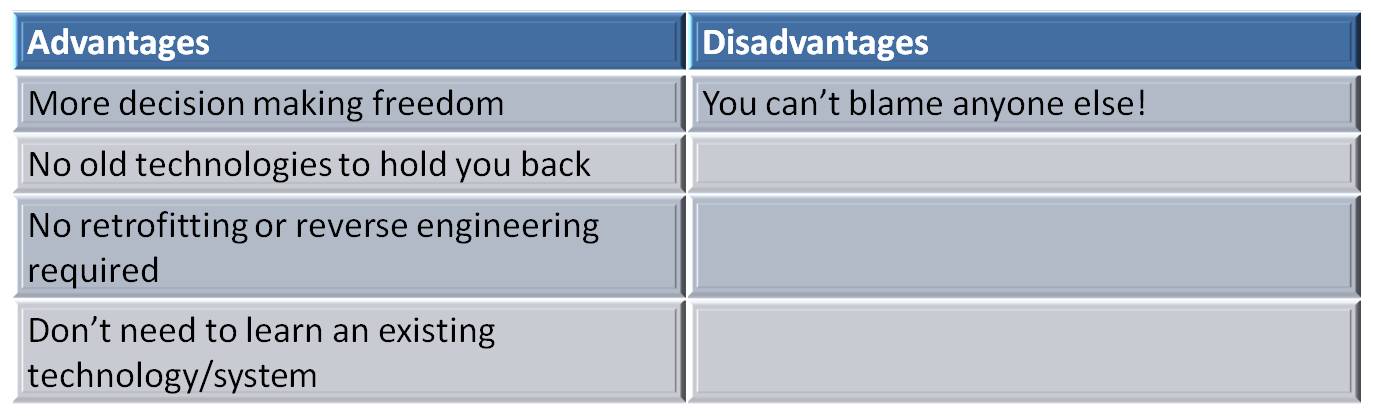
The “warts and all” title was meant to be a caveat that they don’t claim to have got everything perfectly right, and that there were problems along the way on this project. The client for this particular project was “Springer” (a publishing company) and the job was to redesign the website (basically). One of the problems they were aiming to fix was the “time to release”, which was in the region of months, rather than hours, and so they decided to go all Continuous Delivery from the outset. Another thing worth mentioning was that this was a greenfield project, which has its advantages and disadvantages, as outlined here in my incredibly pointless table:

I did that table in Powerpoint, thus highlighting my potential as a senior manager.

Why Continuous Delivery?

The fact that they chose to follow the continuous delivery path right from the outset was an important decision. In my experience, continuous delivery isn’t something you can easily retro fit into an existing system, well, it’s not as easy as when you set out right from the start to follow continuous delivery. Tom put it like this:

You can’t sell continuous delivery as a bolt-on

Which, as usual, is a much better way of putting it than I just did.

Once of the reasons why they went for the continuous delivery approach with this client was to sell more of Jez Humble’s Continuous Delivery book (available on Amazon at a very reasonable price). Just kidding! They would never do that. They actually chose continuous delivery because of the good-practices (I’m trying to stop using the term “best practices” as I’ve learned that it’s evil) it enforces on a project. Continuous delivery allows you to have fast, frequent releases, which forces small changes rather than big ones, and also forces you to automate pretty much everything. They even automated the release notes, which is something we’ve also done on a project I’m working on currently! Our release notes are populated from a template, content pulled in from Jira, and they’re packaged up in every single build. Neat, no? Well Tom seemed pretty impressed with the idea, and I’m quite chuffed that we’re doing the same stuff.

Another reason they opted for a continuous delivery approach was to overcome the IT bottleneck problem.

Look at all the cool stuff I can do with MS paint!!

It would seem that there was an IT black hole which was unable to produce as quickly as the business demanded. I usually hear people say “Agile” is the solution to the IT bottleneck, rather than continuous delivery, but Tom made a point of saying that they were agile as well. I think continuous delivery helps teams to focus on the delivery aspect of agile, and gives us a way of bringing the delivery issues much further back down the line, where they can be addressed more easily, and not at the last minute. As I mentioned earlier, time-to-market was an important driving factor in choosing continuous delivery. I would also add that, in my experience, having a predictable time to market is of great importance to the business. You tend to find that project sponsors don’t mind waiting a couple of weeks, maybe longer, for a change to go live, as long as that estimate is realistic.

The Details

I won’t go into too much technical detail about the project they were working on, so I’ll summarise it like this:

  • Local virtualisation was done using Vagrant and VirtualBox, so dev’s could easily spin up new environments locally.
  • They used Git, and it wasn’t easy. Steep learning curve etc. Using submodules didn’t help either.
  • They had on-site Git go-to people, which helped with the Git learning curve.
  • Devs could deploy to any environment – this was useful for building up environments, but is scary as hell.
  • They kept the branches to a minimum – only for bugfixes or when doing feature toggle releasing.
  • They do check-in stats analysis to “incentivize” people. Small and frequent commits were rewarded.
  • They used Go (they have my sympathy).
  • They deploy using capistrano
  • They deploy to a versioned directory and use symlinks which helps with rollbacks (I’d say this was a pretty standard practice)
  • They use Kickstart and Chef to build workstations, and Chef-Solo for other environments
  • The servers are provisioned with VMWare, the base OS installed with Cobbler/Kickstart, and the “configuration” applied by Chef
  • Even the QA environment was load balanced!
  • This is a long list of bullet points

I was pretty interested with the idea of load balancing the test environment because it reminded me of a problem I had at a company I was working for a few years ago. We didn’t have a load balanced test environment but we did have a load balanced live environment, and one night we did a scheduled production release which just wouldn’t work. It was about 4am and things weren’t looking good. Luckily for me, a particularly bright developer by the name of Andy Butterworth was on hand, and he got to the bottom of the problem and dug us out of a hole. The problem was load-balance related of course. Our new code hadn’t been written for a load balanced cluster, but we never picked it up until it was too late. I’m not sure what past experiences drove Tom and Marc to implement a load balanced test environment, but it’s a good job they did, as Tom testified that it has saved their bacon a few times.

Load balancing QA has saved our bacon a few times!

One of the other things that I was interested in was the idea of using Vagrant and VirtualBox for local VM stuff. I was surprised at this because they are also using VMware. I wondered why, if they’re already using VMware, they don’t just use VMware player for their local VMs?

I was also interested in the way they’d configured Go, which, at a glance, looked totally different to how we’ve got our one setup here where I’m currently working. I’m hoping Tom will shed some light on this in due course!

I loved the idea of using check-in stats to incentivize the team! I’m really keen on the whole gamification thing at the moment, and I’m trying to think of some cool gamified way of incentivizing teams where I work. The check-in stats approach that Tom talked about looked cool, they analyse the number of check-ins per person and also look at the devs comments too, and produce a scoreboard 🙂

More Than Tools

I’ve been to a few talks and conferences recently and one of the underlying messages I’ve got from most of them is that people and relationships are more important than tools, and by that I mean that it’s more important to get relationships right than it is to pick the right tools. Bringing in a new amazing tool isn’t going to fix the big problems if the big problems are down to relationships.

I can think of a few examples: introducing tools like VMware and Chef are great at helping to speed up provisioning and configuring of environments, but if you don’t actually work on the relationships between the development and operations teams, then the tools won’t have any effect, the operations team might not buy into them, or maybe they’ll use them but not in the way the developers want them to. Another example: bringing in a new build tool because your old build system was unreliable. This isn’t going to fix your problem if your problem was that your old system was unreliable because development weren’t communicating clearly with the build engineers.

So relationships are key. But how do we make sure we’ve got good relationships? Well, I think if anyone knew the answer to that one they’d bottle it and sell it for millions. The truth is that it’s different for every situation, but there are things which can make sure you’re all on the same page, which is a start:

  • Have shared goals! I’m often banging on about this. Everyone has to push in the same direction. For me, in reality this often means trying to educate people that we don’t make any money from having reliable builds on developers laptops if the builds are unreliable in the CI/build system. We don’t make money out of finishing all our story points on time. We don’t make money out of writing new features. We make money by delivering quality software to customers! So I think that is exactly what we should all be focused on.
  • Be agile! I know this might seem a bit like it’s the wrong way around, but I actually think that being agile helps to build relationships. It’s a practice and a mindset as much as a process, and so if people share that mindset they’re naturally going to work better together. In my experience, in Operations teams we’ve been quite slow at adopting agile in comparison to other teams. It’s time for this to change. Tom said that on the project he’s working on, the Ops team are agile, and he identified that as one of the success areas.
  • Pair up. There’s nothing quite like sitting next to someone for a couple of days to help you see things from their perspective! On Tom & Marc’s project at Springer they paired the ops guys with dev. I would recommend going further and pairing dev with support engineers, QA (obvs!) and build/release management on a regular basis. Pairing them with users/customers would be even better!
  • Skill up. Tom & Marc talked about cross pollination of skills, and by this he means different people (possibly from different teams) learning parts of each others trade and skills. Increasing your skillset helps you understand other people’s issues and problems better, as well as making you more valuable, of course!

I became a better developer by understanding how things ran in Production – Marc Hofer

Summary

In summary – Tools are important, people and relationships are importanter (new word), you should automate everything, take little steps instead of big ones, stick to the principles of continuous delivery, and the new Snow White movie is bollocks.

Upcoming Agile/DevOps/CI Events

There’s a free talk this evening at Skills Matter (London) about Continuous Delivery by Tom Duckering and Marc Hofer. Tom did a talk on “Coping with Big CI” a few months ago, which was interesting and very well delivered. I’m looking forward to tonight’s talk.

Then tomorrow there’s the DevOps summit (again in London), which is being chaired by Stephen Nelson-Smith, author of “Test-Driven Infrastructure with Chef” (you can find my review of the book here). Atlassian and CollabNet will have speakers/panelists at this event so I’m expecting it to be very worthwhile.

On the 26th June, again in London (it’s all happening in London for a change), there’s Software Experts Summit, subtitled “Mastering Uncertainty in the Software Industry: Risks, Rewards, and Reality”, I’m expecting there will be a decent amount of DevOps/Continuous Delivery coverage. Speakers include representatives from Microsoft and Groupon.

Next Thursday (June 28th) there’s an Agile Evangelists Meetup in London entitled “Agility within a Client Driven Environment” with talks from experienced agile experts from a range of industries. These are usually pretty good events and the speakers usually have a great deal to offer.

And as I mentioned in an earlier post, there’s the Jenkins User Conference in Israel on July 5th.

What’s Going On?

Here’s a bunch of upcoming talks, courses, conferences, things and stuff, which I reckon might be worth checking out.

Managing javascript with Gradle – Free event @ Skills Matter (London) May 22nd 6:30pm

Insight for CI – Webinar May 23rd 11am and again at 2pm EDT

Goto Conference – Amsterdam May 24-26

Thoughtworks Live – Picadilly, London May 24th (all day)

Configuration Management Conference – (£80) London, May 29th (all day)

Thoughtworks Quarterly Briefing – Liverpool Street, London May 30th 6:30pm

Agile Development West – Las Vegas, June 10 – 15th

Gradle Build Automation Evolved – Free event @ Skills Matter (London) June 12th 6:30pm

Continuous Delivery Workshop – (£695, €695) London July 5th. Berlin June 12th, Dusseldorf  June 14th

Devops summit – London, June 20th

Jenkins User Conference – Israel, July 5th (all day)

I will add to this list as and when I find out about any interesting new events.

Maven the Version Number Nazi

Maven doesn’t like it when you use different verison numbers to the Maven standard format. Of course it doesn’t. It wouldn’t would it? It’s Maven, and Maven only likes it when you do what it tells you to do. I’m still a bit annoyed with Maven, as you can probably tell.

Don’t get me wrong, I’m not “Maven bashing”, it’s just that this particular problem doesn’t have quite the elegant solution I was looking for. I do appreciate Maven, honestly.

This was the problem:

I wanted to change our versioning system from something like 1.0.0-1234 to something like 1.0.0-1234-01

Why the hell would I want to do that?? I’ll explain…

Our verisoning is like this:

{major}.{minor}.{patch}-{build}

The only problem was, the build number was taken from the Perforce check-in number, and this number didn’t always change whenever a build was made, especially if the build was kicked off by an upstream dependency, or a forced build was triggered. Basically, if the build was kicked off by anything other than a commit to Perforce, the build would create an artifact of identical version to the previous build. This, in theory, shouldn’t be a problem, because it is actually building exactly the same thing, but I just don’t like it. Anything could happen, any environmental change could produce a slightly different build to the previous one.

The problem was that I wasn’t using an incremental counter anywhere in my version numbe. It’s essential to have an incrementing version number in order to ensure that every single build creates a unique identifier, so that no two different builds can appear to be the same build.

My first thought was to append a build counter on the end, like this:

{major}.{minor}.{patch}-{build}-{counter}

And that would have worked fine, if it wasn’t for the fact that we use version ranges in our dependencies, and we already have plenty of builds which use the previous versioning system. Maven kept picking up the builds with the previous version system, even though, in every possible sense, the new ones had higher version numbers. It made no sense. That’s when I looked into how maven works out versions. Basically it says “if you’re using version ranges, and not using the maven standard versioning format, you might as well forget it”. If it sees dependencies using the standard format, and ones using the non-standard maven format, it’ll pick up the standard format ones and basically ignore the new ones. To get around this you can delete all the old builds using the standard maven format, and then it’ll work, because it’ll treat each build version like a string and just get you the latest in whatever your range is.

Sadly, this isn’t an option for me, as I want to kep the old builds using the old format. So I tried a few things. I tried putting a string in as a separator, so it would look like this:

{major}.{minor}.{patch}-{build}rc{counter}

This effectively produces something looking like:

1.0.0-1234rc01

I’m fine with that. Maven, on the other hand, isn’t. I made a build with this version 1.0.0-9999rc01 and used it as a dependency in another build, but the other build still went and got 1.0.0-1234, the OLD build using the standard maven versioning. I mean, you’d think 1.0.0-9999rc01 > 1.0.0-1234 but apparently not.

I was a bit pushed for time so I couldn’t spend forever looking into this, so I’ve basically just appended the build counter directly onto the end of the perforce number. This works ok, but just looks a little ugly.

There’s more information on the Maven versioning rules here. It seems that you can break the rules no problems, but you’re in trouble if you use version ranges in your dependencies, and your dependencies need to live alongside binaries which use the standard maven versioning system 😦

If anyone has any better solutions I’d like to hear them. And please don’t say “stop using Maven”.


Test-Driven Infrastructure with Chef – Book Review

A while ago I ordered a copy of “Test-Driven Infrastructure with Chef” from Amazon. It must have been sometime last summer in fact. It took months to arrive, because they simply didn’t have enough copies. So when it finally did arrive, I was very excited to see if my wait was worth the, er, wait.

Written by Stephen Nelson-Smith (he of @LordCope twitter fame and author of the excellent Agile Sysadmin blog), Test-Driven Infrastructure with Chef is by no means “War And Peace”. In fact it’s pretty tiny, and looks more like a pamphlet than a book. But what it lacks in size it more than makes up for in concise content.

What I really like about this book is that it feels absolutely perfect for someone like me, and by that I guess I’m trying to say that the target audience is well thought out. It’s aimed at Developers, Ops Engineers, DevOps, Sysadmins and Release engineers, those sorts of people. It assumes you know a certain amount about your own business, and so I don’t find myself sitting there reading some really basic stuff that anyone in my line of work is bound to know already. I’ll take the Continuous Delivery book as an example – it’s a great book, but some of it is about introducing Continuous Integration! I would have thought that if you were about to embark on Continuous Delivery, the first thing you’d already be VERY comfortable with would be C.I. so why the need to cover that all over again? Besides, there are plenty of good C.I. books on that subject. Of course, I know that the Continuous Delivery book is in actual fact aimed at a much wider audience, but what I’m trying to say here is that Test-Driven Infrastructure with Chef is more targeted, and I feel it’s a much easier read for it.

Infrastructure as Code

The fundamental premise of this book, and indeed the main point of Chef itself, is that we should treat infrastructure as code. What this means is that managing, designing, deploying and testing infrastructure should be done in an analogous fashion to how we do these same things with software. The code that  builds, deploys and tests our infrastructure should be committed to source-control in the same way as the code that builds, deploys and tests our software is.

This approach brings with it many of the same principles as we have around building, deploying and testing our software, and these are listed in chapter 1. Also listed here are the advantages of treating your infrastructure as code, things such as repeatability, automation, agility, scalability, disaster recovery and very importantly, reassurance!

The book goes on to introduce the reader to Chef. Chef is an open source tool for managing, deploying and configuring infrastructure. It’s produced by Opscode – check out the website for more information. The book explains about the Chef tool, framework and API, and then goes on to give instructions on how to install it (you’ll need Ruby installed – and the book covers this, using RVM). You’ll also get an introduction to Git (and GitHub) here too, and how to install Git on Ubuntu. Incidentally, all the examples are based on an Ubuntu system, so if you follow the examples closely, it’s best to have Ubuntu, or an Ubuntu vm at hand. That’s not to say that the examples can’t be done on other systems, but I would guess that centos would require a lot more behind-the-scenes configuring, thanks to its less-than-fantastic package repositories.

Cucumber-Chef

Chapter 4 provides a nice introduction and description of Test-Driven and Behavior-Driven Development, and talks a little about the Acceptance Test automation tool Cucumber, before chapter 5 goes into some more detail about Cucumber-Chef (don’t worry if you haven’t heard about this before, the book tells you all you need to know to get started, but for now let’s just say it does for infrastructure what Cucumber does for code).

I couldn't find the logo for cucumber-chef, so here's a picture of a cucumber...

...and chef

Chapter 5 introduces us to the Amazon EC2 Web Service. It shows you how to get setup with a personal account (which is nice and easy), because you’ll need it to work through the examples that follow! This is one of the things that I like most about this book, it’s a practical guide, it’s as if the author knew (which he obviously did) that his target readers are the types of people who like to get stuck in and do stuff. Chapter 5 finishes off with instructions on installing Chef and using a couple of the built-in tasks.

Recipes, Roles and Cookbooks

It’s chapter 6 and time for a worked example using cucumber-chef. This is where we first meet Recipes, Roles and Cookbooks. First, we learn how to do cucumber style Given, When, Then Acceptance tests, and we start TDDing. This chapter really is about how to apply test-driven development to an operations solution. Requirements are gathered, Acceptance criteria are identified, Acceptance Tests are written (before we actually do any Chef scripting, as per TDD), and we follow the “Red, Green, Refactor” model until we have a working solution. In my copy there’s a glaring mis-print on page 48, where the given, when, then example ends up being “given, when, when” 🙂 Hopefully this’ll get corrected in future editions.

The final chapter underlines how managing our infrastructure as code, and applying the principles of test-driven development can help us increase our quality and reduce the usual risk associated with deploying infrastructure.


Conclusion

This book will serve as a great introduction to Chef for anybody who learns best via hands-on examples. But it’s much more than an introduction to Chef, it’s really about the practice of test-driven development, and about how to apply the principles of TDD to infrastructure management.

Using Chef in itself is a step in the right direction – it allows us to treat infrastructure as code, and this has so many benefits – we can version our configurations much more easily, we can store our configurations in a proper source code management tool, we can deploy configurations sensibly, and so on. And applying TDD principles to your Chef “development” obviously looks like a great idea, it brings with it all the goodness of TDD, and gets us to think in terms of requirements and acceptance criteria before we start building our systems, ensuring that what we produce is fit for purpose.

Even if you don’t follow TDD, or don’t plan to follow TDD for your infrastructure development, this book is still very much well worth the read. The hands-on approach using examples you can actually work with, is refreshing. I’ve probably learned more from working through this little book than I have from reading most other voluminous technical guides.